<- back
 The Macbook Air throttles a lot
8 jun 2023
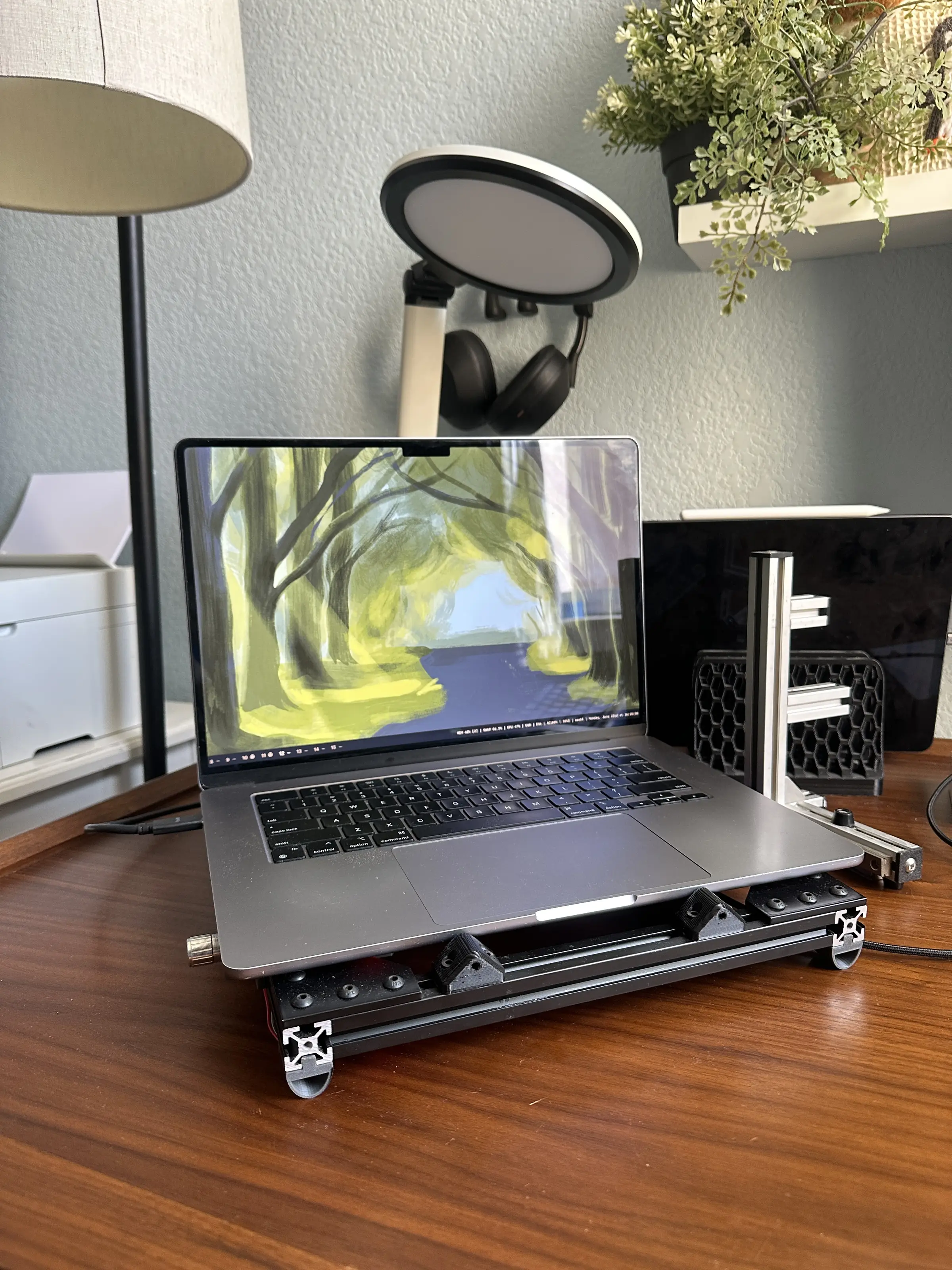 Without a fan and with summer slowly ramping up, I often find my M2
MacBook Air 15" heating up and becoming hot to the touch while building
Xcode projects or running CAD software. I wanted to measure its actual
performance impact and see how effective a simple solution would be.
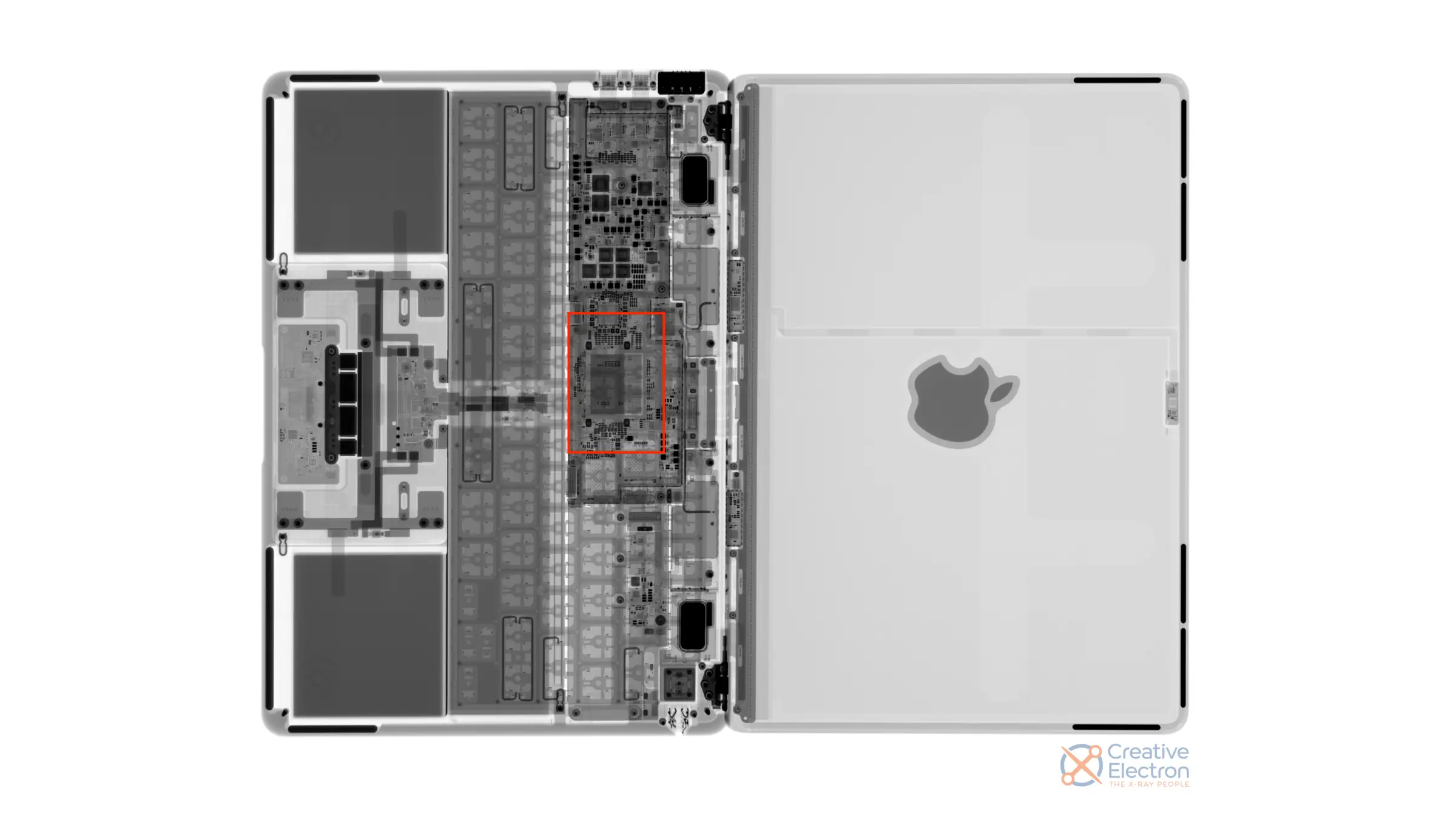
The MacBook Air has its SoC (CPU/GPU+RAM) in the middle of the chassis
close to the display, as seen in this Creative Electron scan:
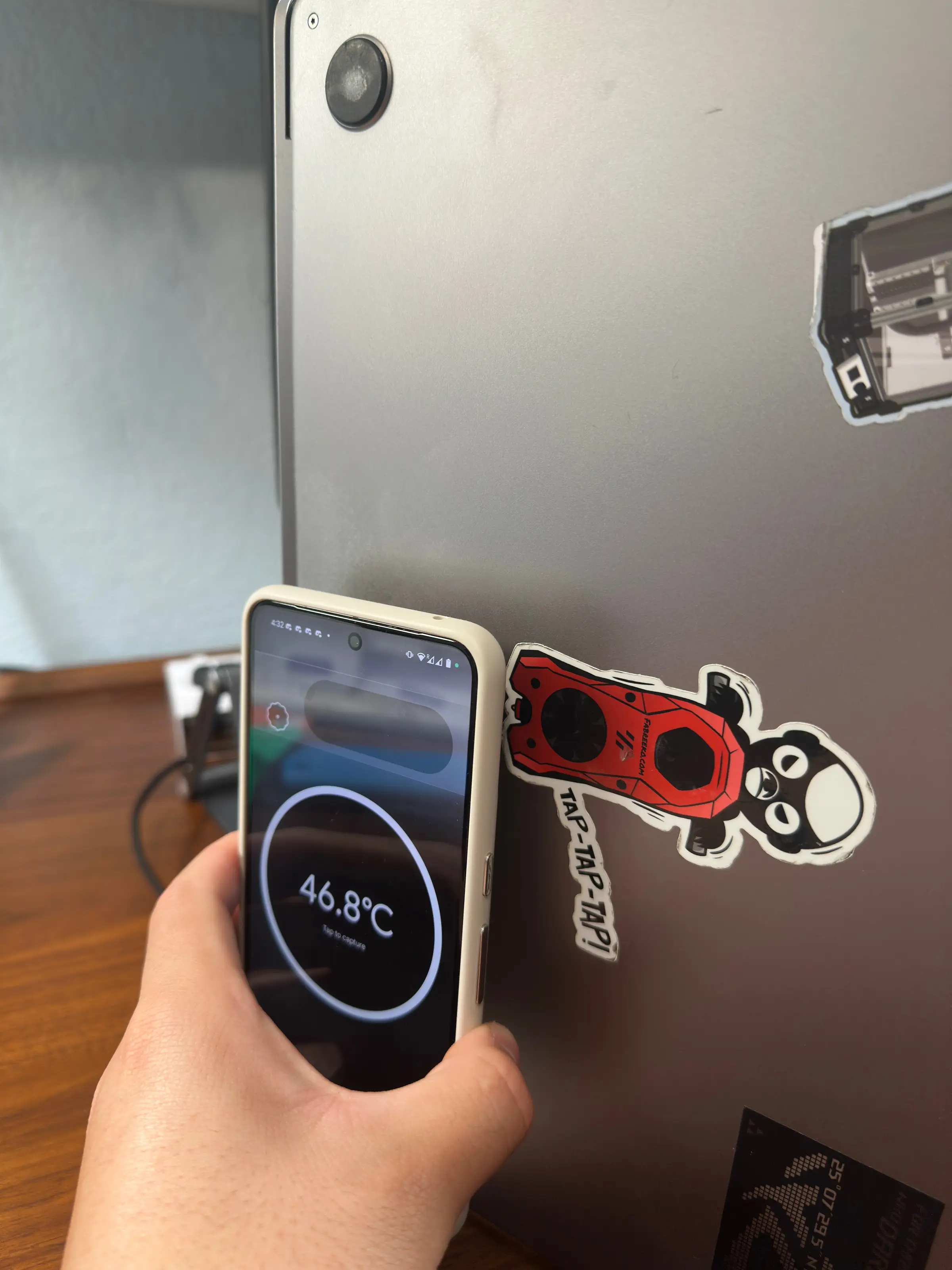
 Under medium-heavy load, I have measured this area externally to be
around 50 degrees.
 ## Existing Options
-------------------
### Thermal Pad Mod
Popularly, there is a thermal pad mod for the M-series of MacBooks, due
to the lack of a heatsink. The mod places a thermal pad over the SoC,
sinking it to the bottom chassis.
- However, sinking the SoC to the chassis indirectly sinks the SoC to
the battery modules, which also sink to the chassis. Without active
cooling to remove the heat from the chassis, this will mean the SoC
will be pumping heat directly into the battery.
### Airjet
Fore Systems' airjet is a solid-state cooling system based on
piezoelectric actuators, requiring no moving parts and fitting into a
slim package. Fitting it into a MacBook, they managed to "increase
sustained power by 67%".
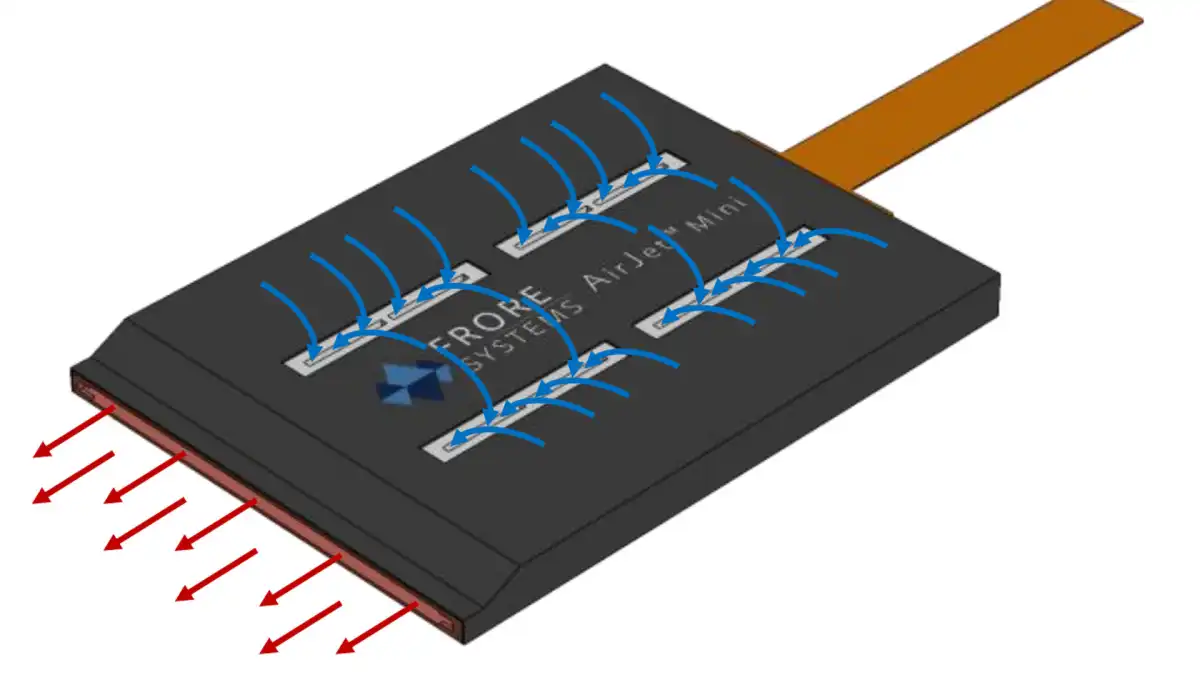 - I originally wanted to go with this; it's compact and integrated.
Unfortunately, Fore Systems does not sell to individuals and only to
system integrators for use in their products.
### Laptop Coolers
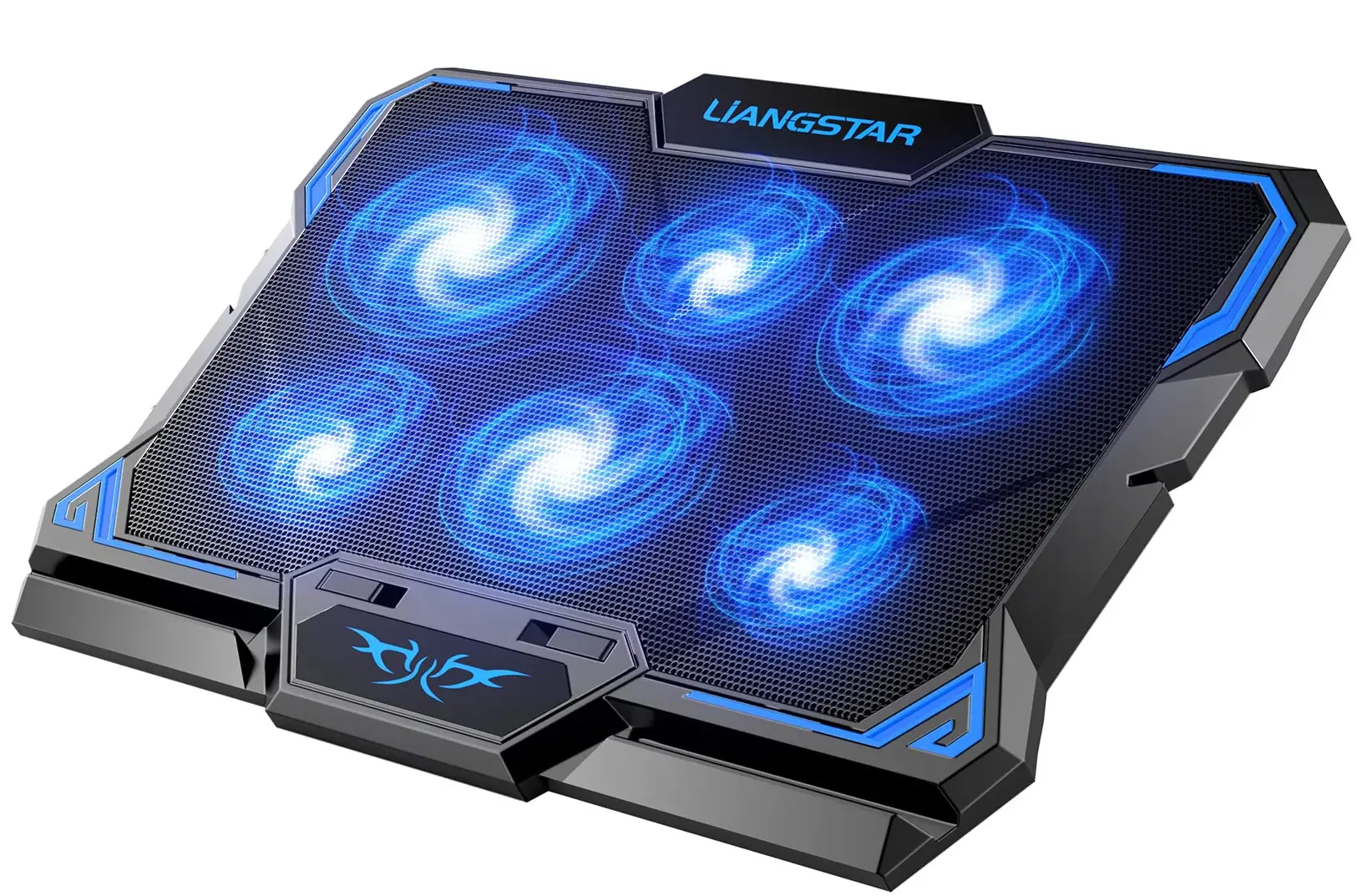
Laptop coolers have been commonly used for gaming laptops; this is the
simplest design possible with fans pointing at the bottom of the laptop.
 ### Water Cooling
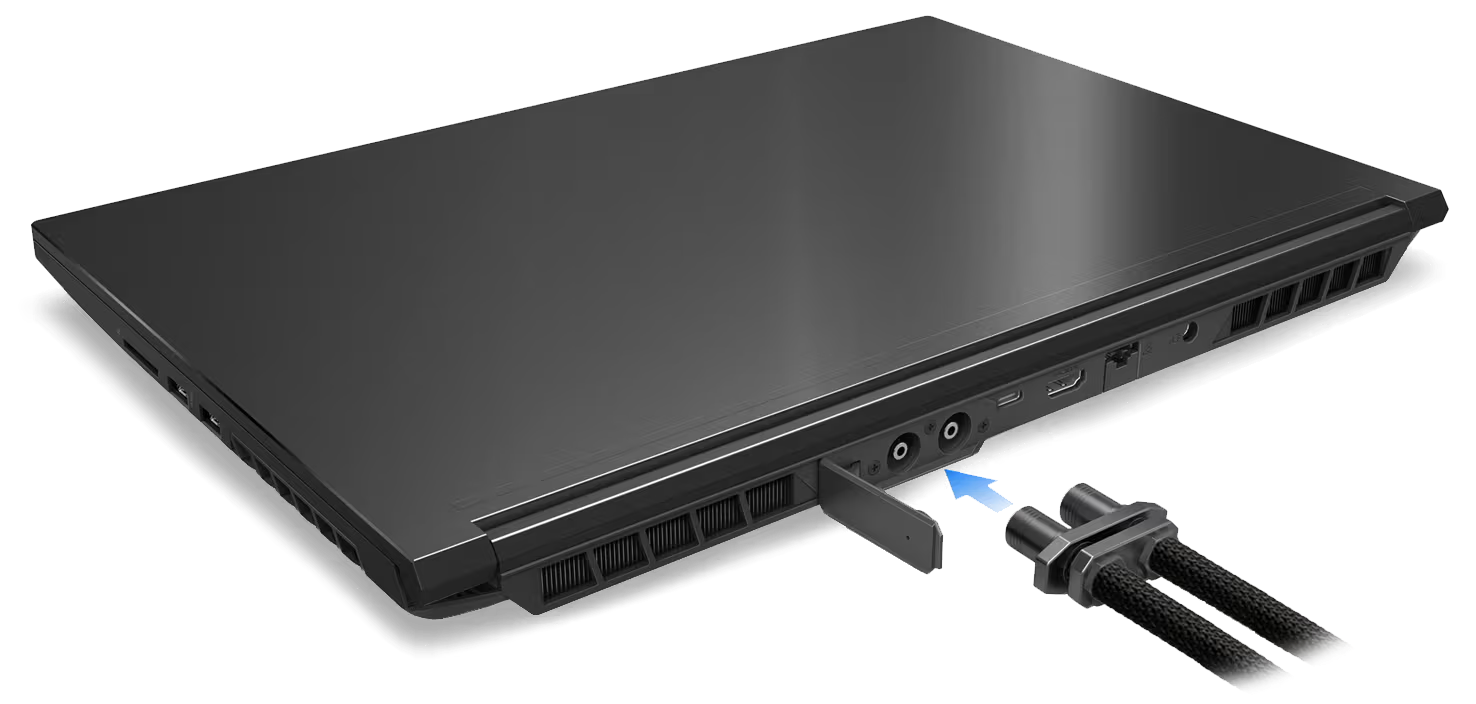
The Liquid Propulsion Package from Eluktronics modifies the vapor
chamber in a laptop into a waterblock, and adds in/outtake ports at the
back of the laptop to be attached to a desktop radiator.
 ## Decision
-----------
As the Airjet Minis are not for sale and water-cooling is infeasible
since the MBA is too thin for any type of water-cooling solution (and I
do not possess the ability to manufacture water blocks), the Thermal Pad
Mod and Fan-Based Cooler Stand are the only realistic options.
I'm worried about the Thermal Pad Mod sinking unnecessary heat into the
battery, hurting battery longevity and being potentially dangerous as
well. Sadly, I probably have to go with the fan-based cooler (I wanted
an excuse to open up the laptop).
## Market Options
-----------------
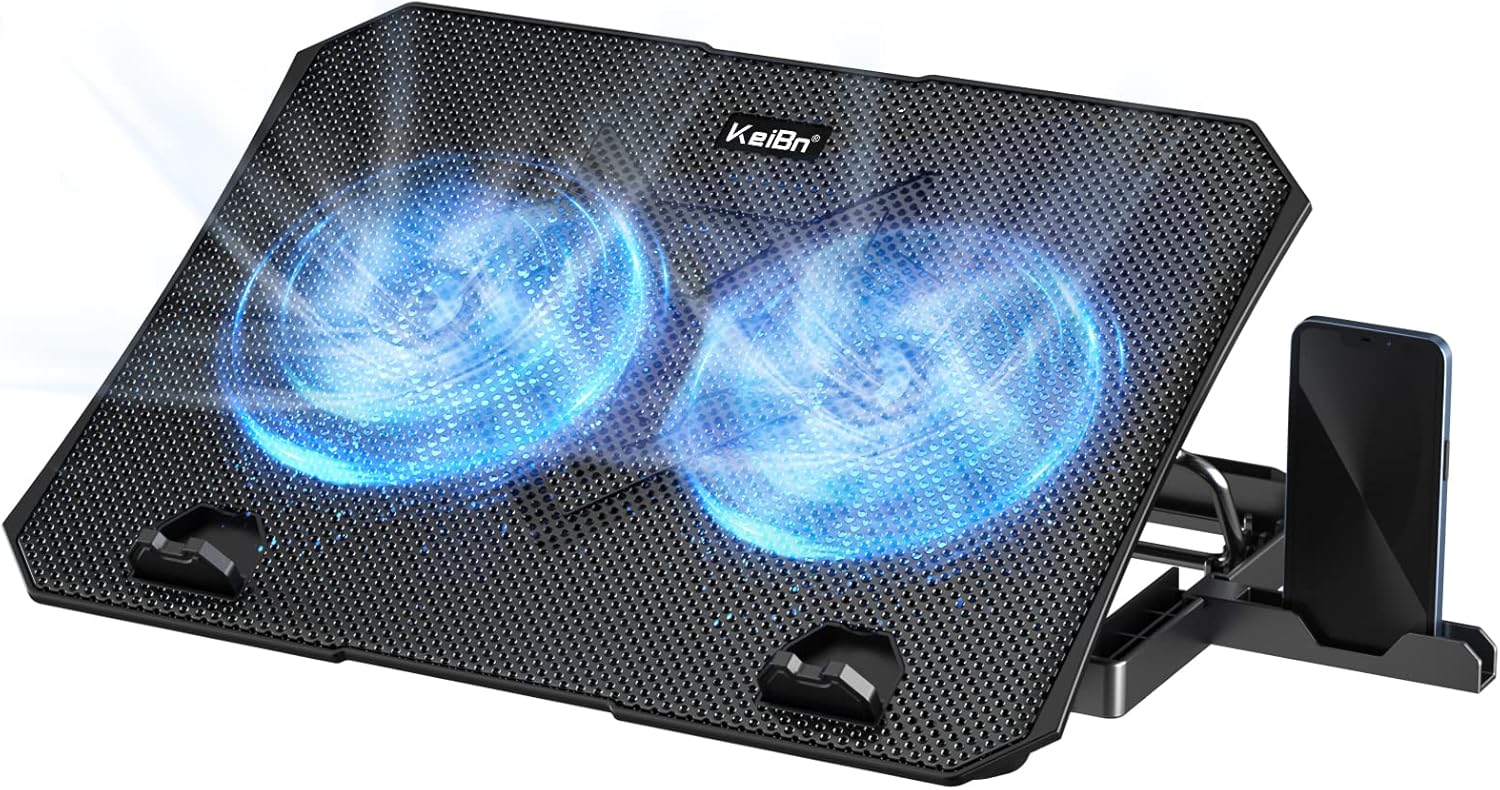
A lot of the fan cooler options (like the one above) are geared more
towards gaming—flashy RGB, etc.—which would look out of place next to a
MacBook. The other options have an ugly wireframe mesh at the bottom and
thin stamped sheet metal that looks unnecessarily complicated, such as
the ones below:
 There are cleaner options, like this Razer cooling pad; however, this is
$149, which is insane for a piece of metal with an addressable fan.
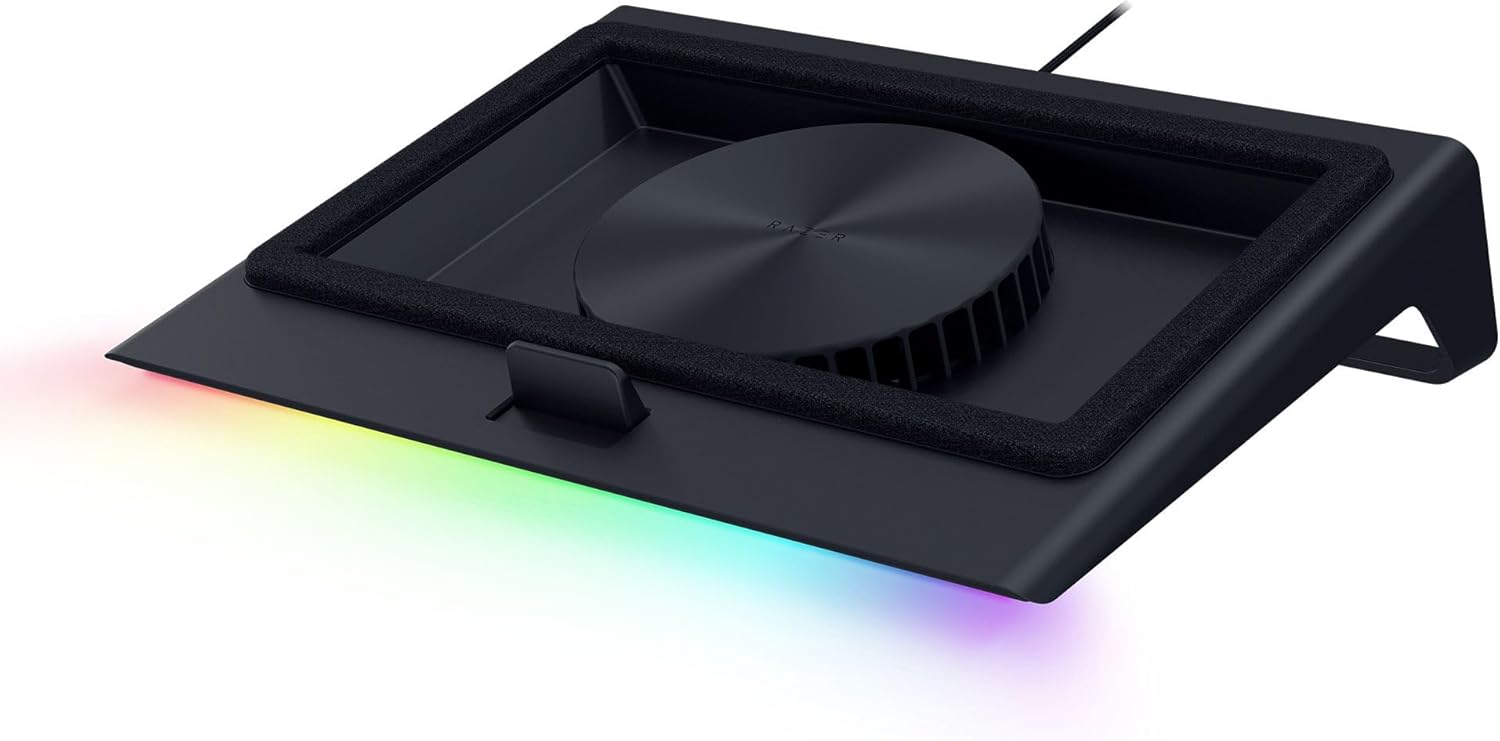 There is a takeaway from this Razer cooling pad: the ability to tie into
the computer and adjust fan curves based on CPU temperatures (PID
Control??)
## The Build
------------
### Targets
- Robust
- Built from Metal
- Addressable Fan
- Manual Speed Control
- Tie into OS/CPU Temps (Optional)
### Hardware
2020 aluminum extrusion was a great fit for the industrial aesthetic and
robust characteristics compared to sheet metal. I sourced mine from
MiSUMiUSA.
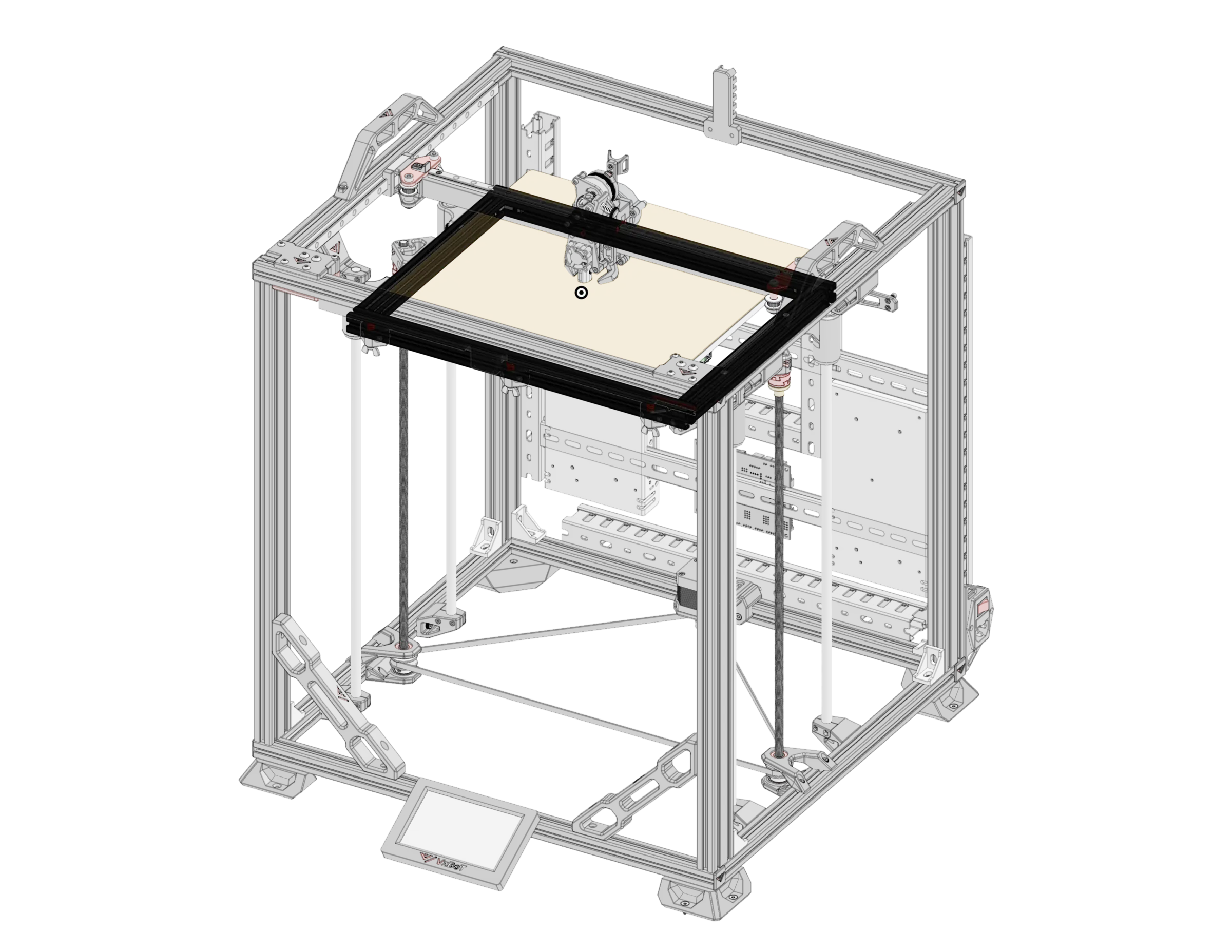
I'm reusing the extrusion from the VZ330's bed assembly (highlighted
below):
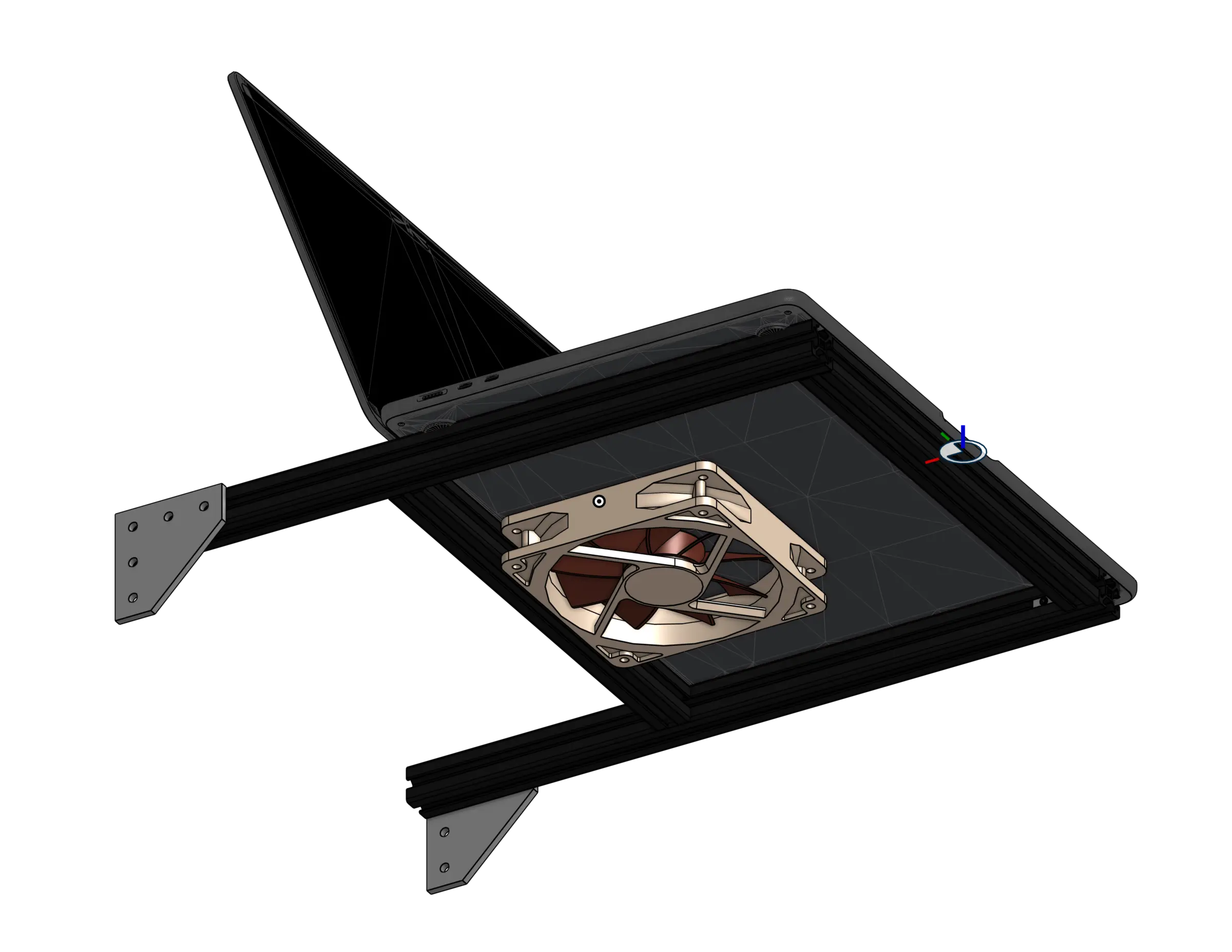
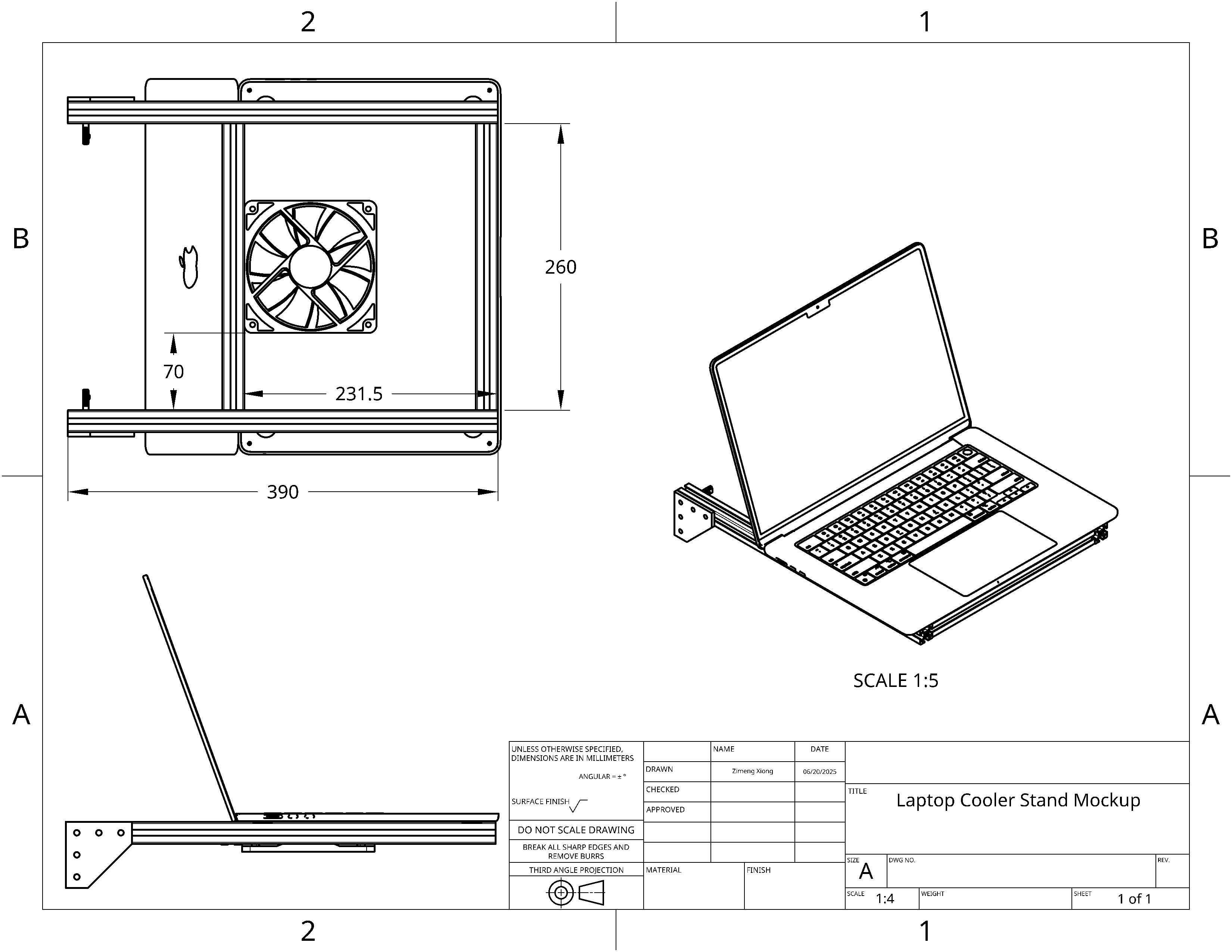
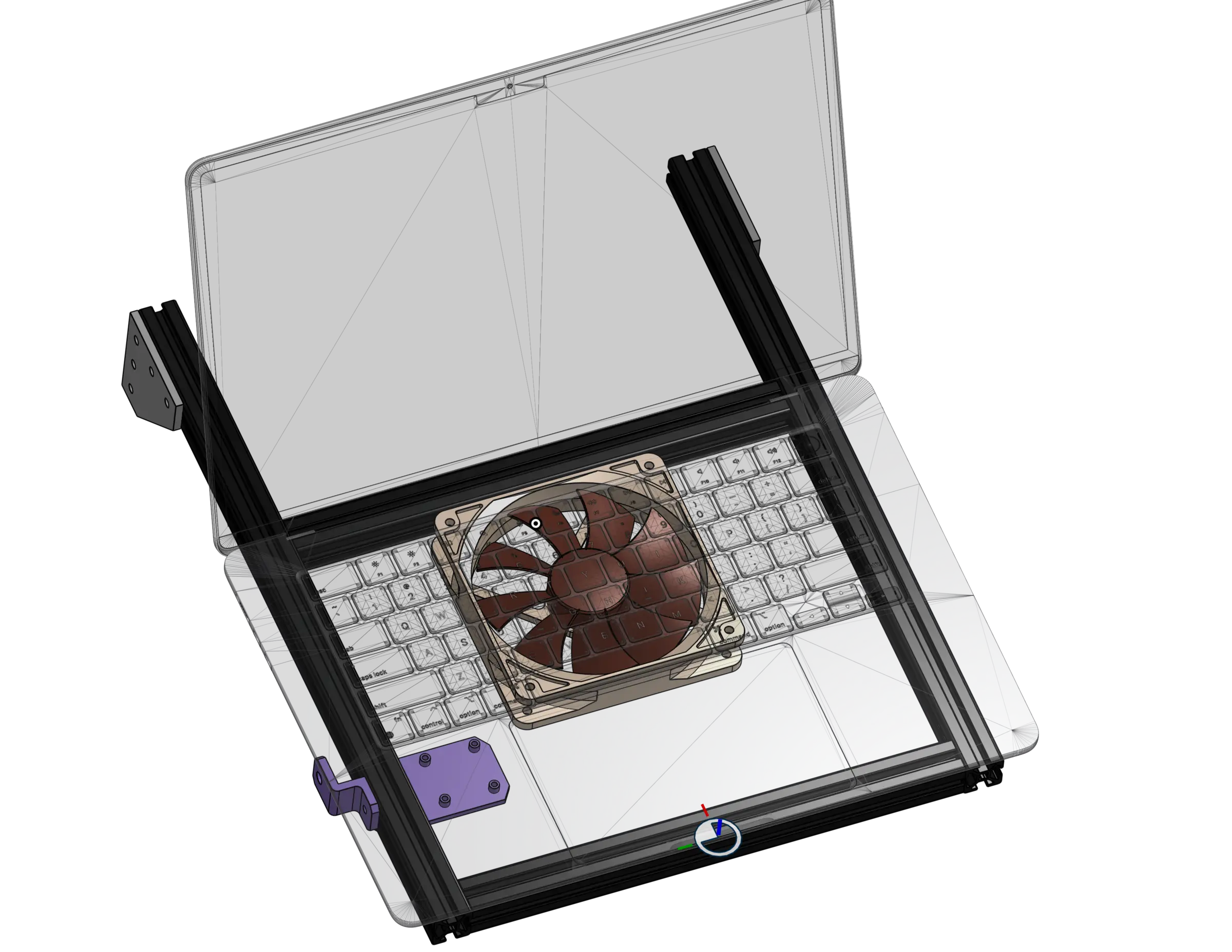
 This is a quick mockup of the design, with one Noctua Industrial iPPC
NF-F12 3000RPM at the bottom in the middle of an extrusion frame, with
the laptop lifted by some 20mm extrusion bracing plates.
 ### Electronics
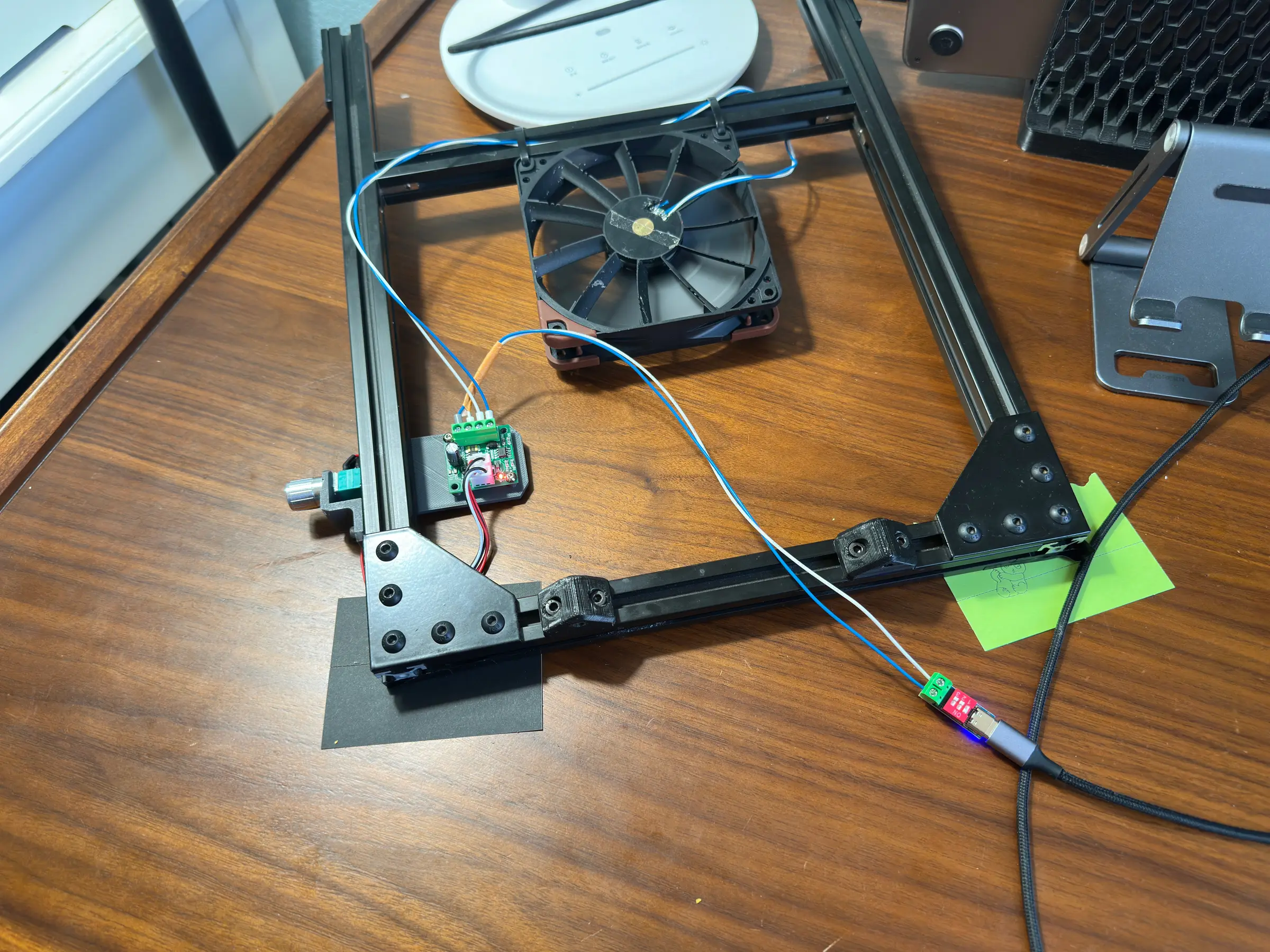
To control the fan, I'm using this PWM motor driver with a knob that I
had lying around, with a generic 12V AC wall adapter which I sliced off.
Here's a quick proof of concept build:
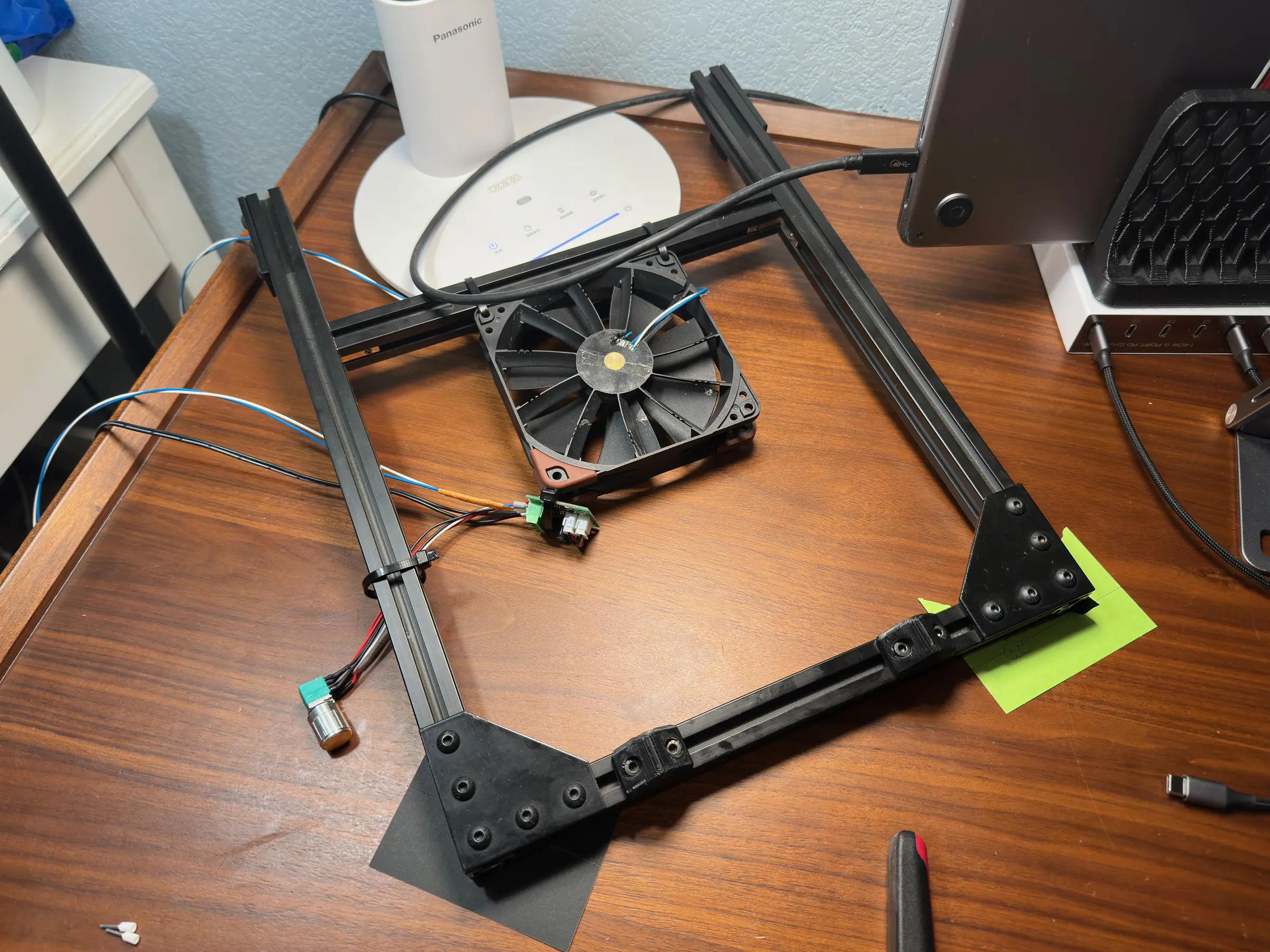 Seeing that it works pretty well (as expected), I designed proper mounts
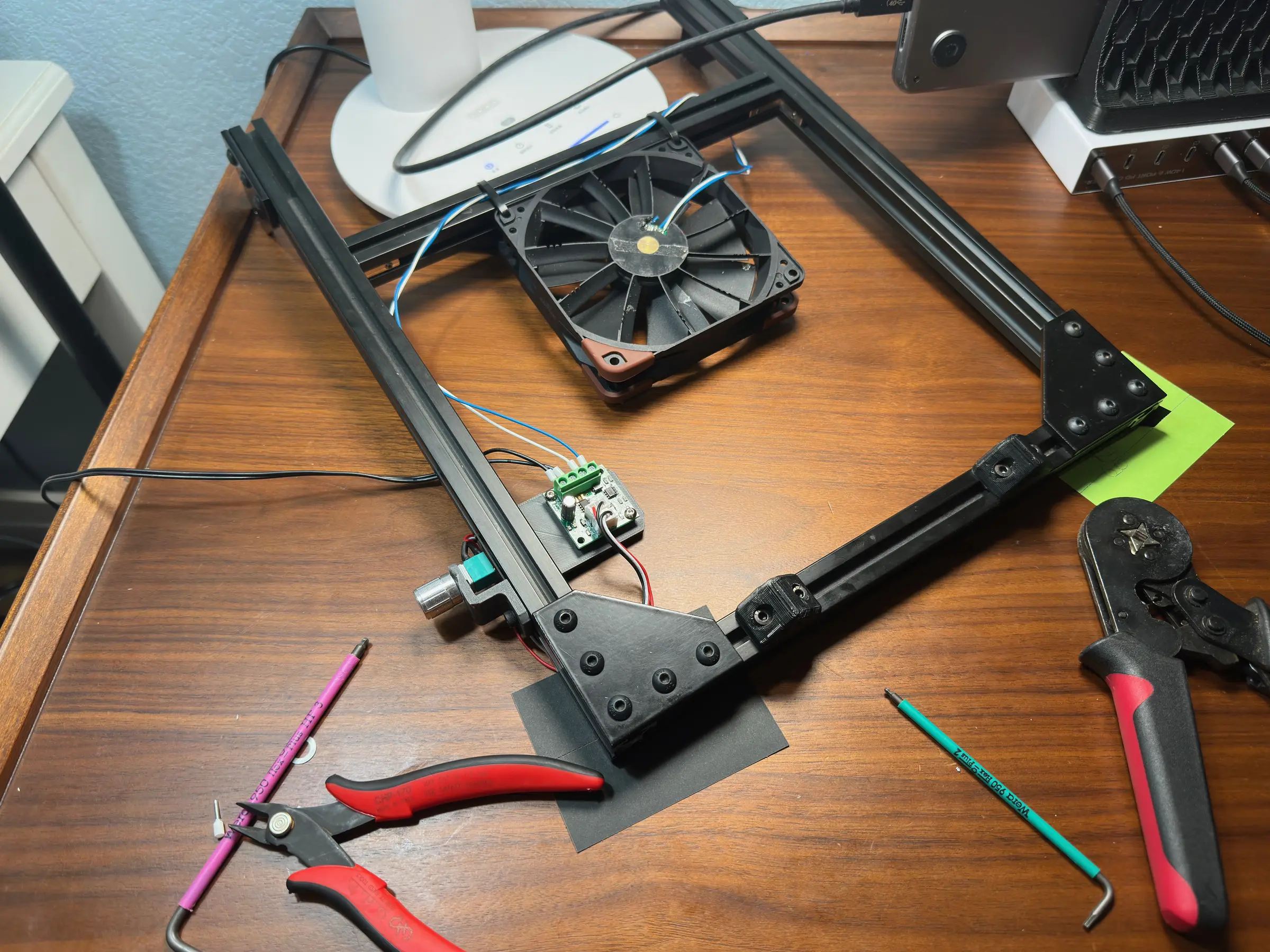
for the PWM control board and knob (below in purple):
 Mounted:
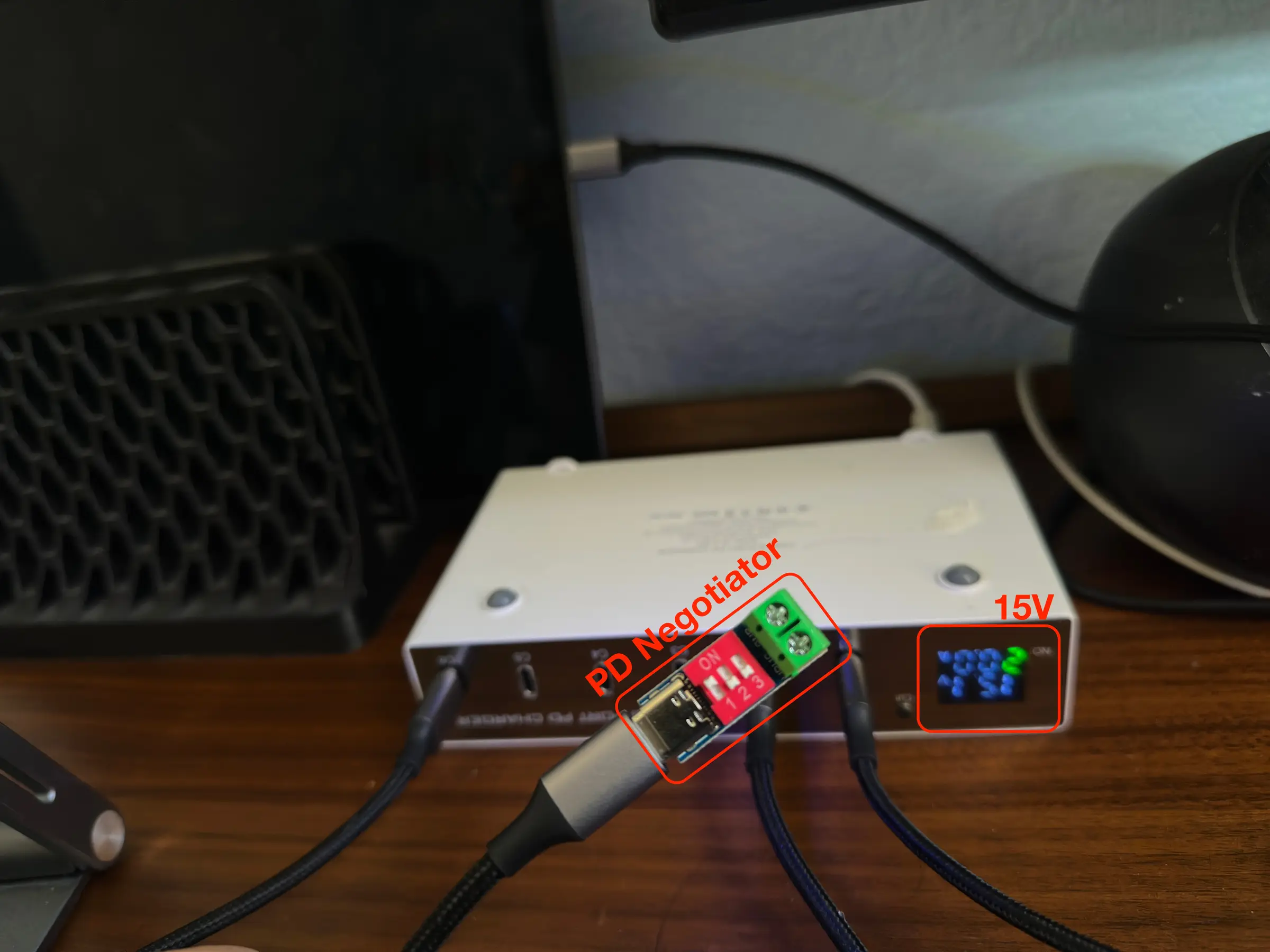
 Furthermore, the fan was almost too quiet and barely blowing much air,
so I decided to over-volt the fan to above 12V. This was accomplished
using USB-C PD (power delivery), which allows for 15V with a supported
PD charger. I happened to have some of these modules which do the
handshake (note the voltage my PD charger's display is being negotiated
boxed in red):
 Everything wired up!
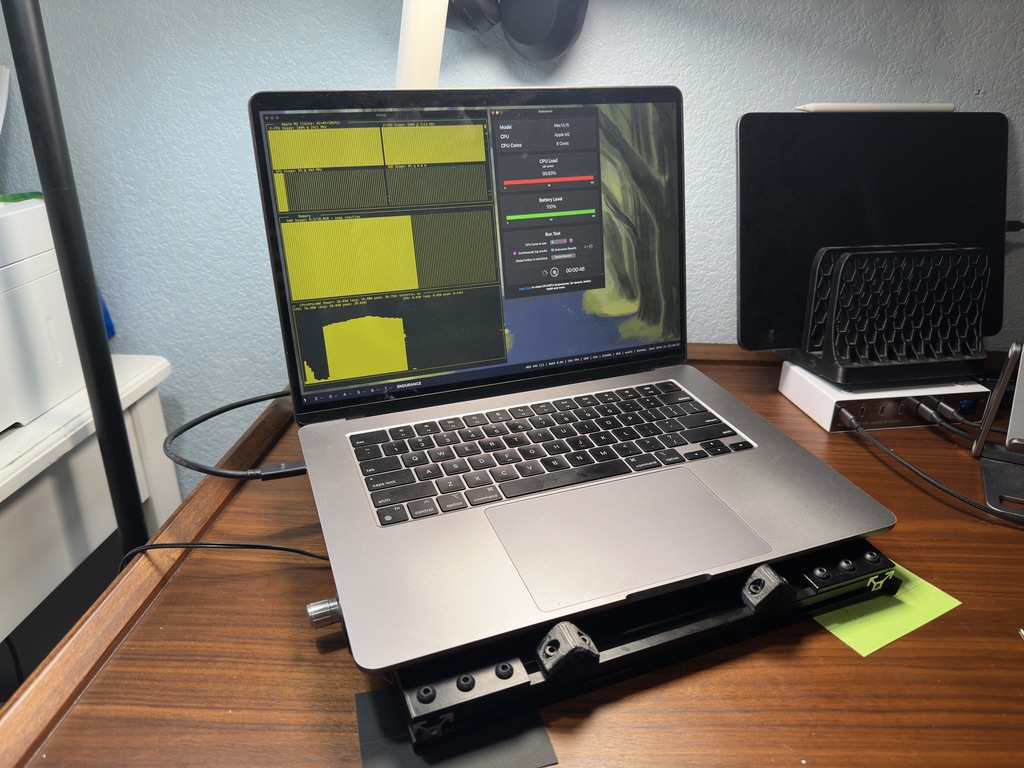 In total, we have over 55+ CFM of airflow towards the back of the
MacBook.
## Benchmark and Testing
------------------------
Using Endurance, a free CPU Stress Test app to perform an all-core
stress test, alongside asitop, an Apple Silicon performance monitoring
tool to measure core frequencies and power output, I measured the impact
of the fan solution.
I wrote a script to extract and log clock speeds from the built-in
`powermetrics` utility:
.-----------------------------------------------------------------------
| zimengx@asahi ~ [1]> sudo powermetrics
|
| **** Processor usage ****
|
| E-Cluster HW active frequency: 1373 MHz
| E-Cluster HW active residency: 100.00% (600 MHz: 0% 912 MHz: 53% \
| 1284 MHz: 10% 1752 MHz: 16% 2004 MHz: 3.6% 2256 MHz: 2.9% 2424 \
| MHz: 14%)
| E-Cluster idle residency: 0.00%
| CPU 0 frequency: 1435 MHz
| CPU 0 active residency: 65.01% (600 MHz: 0% 912 MHz: 32% 1284 \
| MHz: 6.9% 1752 MHz: 11% 2004 MHz: 2.6% 2256 MHz: 2.3% 2424 MHz: \
| 11%)
| CPU 0 idle residency: 34.99%
| CPU 1 frequency: 1439 MHz
| CPU 1 active residency: 61.34% (600 MHz: 0% 912 MHz: 30% 1284 \
| MHz: 6.3% 1752 MHz: 11% 2004 MHz: 2.5% 2256 MHz: 2.1% 2424 MHz: \
| 10%)
| CPU 1 idle residency: 38.66%
| CPU 2 frequency: 1431 MHz
| CPU 2 active residency: 61.63% (600 MHz: 0% 912 MHz: 30% 1284 \
| MHz: 6.3% 1752 MHz: 11% 2004 MHz: 2.6% 2256 MHz: 2.1% 2424 MHz: \
| 9.9%)
| CPU 2 idle residency: 38.37%
| CPU 3 frequency: 1439 MHz
| CPU 3 active residency: 58.63% (600 MHz: 0% 912 MHz: 28% 1284 \
| MHz: 6.4% 1752 MHz: 9.7% 2004 MHz: 2.5% 2256 MHz: 2.1% 2424 MHz: \
| 9.8%)
| CPU 3 idle residency: 41.37%
|
| P-Cluster HW active frequency: 1232 MHz
| P-Cluster HW active residency: 59.45% (660 MHz: 37% 924 MHz: .28% \
| 1188 MHz: 3.8% 1452 MHz: 3.1% 1704 MHz: 2.0% 1968 MHz: 1.9% 2208 \
| MHz: 1.3% 2400 MHz: .96% 2568 MHz: .54% 2724 MHz: 1.1% 2868 MHz: \
| .60% 2988 MHz: .35% 3096 MHz: .42% 3204 MHz: 3.5% 3324 MHz: 1.6% \
| 3408 MHz: .55% 3504 MHz: 0%)
| P-Cluster idle residency: 40.55%
| CPU 4 frequency: 2398 MHz
| CPU 4 active residency: 25.99% (660 MHz: .26% 924 MHz: .21% 1188 \
| MHz: 3.6% 1452 MHz: 3.0% 1704 MHz: 2.1% 1968 MHz: 2.2% 2208 MHz: \
| 1.7% 2400 MHz: .97% 2568 MHz: .46% 2724 MHz: 1.4% 2868 MHz: .65% \
| 2988 MHz: .47% 3096 MHz: .55% 3204 MHz: .38% 3324 MHz: .58% 3408 \
| MHz: .80% 3504 MHz: 6.7%)
| CPU 4 idle residency: 74.01%
| CPU 5 frequency: 2643 MHz
| CPU 5 active residency: 18.52% (660 MHz: .06% 924 MHz: .06% 1188 \
| MHz: 1.6% 1452 MHz: 1.5% 1704 MHz: 1.2% 1968 MHz: 1.7% 2208 MHz: \
| 1.1% 2400 MHz: .60% 2568 MHz: .33% 2724 MHz: 1.3% 2868 MHz: .50% \
| 2988 MHz: .29% 3096 MHz: .41% 3204 MHz: .36% 3324 MHz: .38% 3408 \
| MHz: .72% 3504 MHz: 6.5%)
| CPU 5 idle residency: 81.48%
| CPU 6 frequency: 2705 MHz
| CPU 6 active residency: 12.08% (660 MHz: .02% 924 MHz: .02% 1188 \
| MHz: 1.0% 1452 MHz: .88% 1704 MHz: .57% 1968 MHz: 1.2% 2208 MHz: \
| .53% 2400 MHz: .19% 2568 MHz: .13% 2724 MHz: 1.1% 2868 MHz: .39% \
| 2988 MHz: .21% 3096 MHz: .29% 3204 MHz: .19% 3324 MHz: .24% 3408 \
| MHz: .59% 3504 MHz: 4.5%)
| CPU 6 idle residency: 87.92%
| CPU 7 frequency: 2812 MHz
| CPU 7 active residency: 8.65% (660 MHz: .02% 924 MHz: .02% 1188 \
| MHz: .55% 1452 MHz: .54% 1704 MHz: .21% 1968 MHz: .81% 2208 MHz: \
| .28% 2400 MHz: .12% 2568 MHz: .09% 2724 MHz: 1.1% 2868 MHz: .31% \
| 2988 MHz: .15% 3096 MHz: .18% 3204 MHz: .12% 3324 MHz: .22% 3408 \
| MHz: .44% 3504 MHz: 3.5%)
| CPU 7 idle residency: 91.35%
|
| CPU Power: 1664 mW
| GPU Power: 76 mW
| ANE Power: 0 mW
| Combined Power (CPU + GPU + ANE): 1740 mW
|
| **** GPU usage ****
|
| GPU HW active frequency: 461 MHz
| GPU HW active residency: 16.32% (444 MHz: 16% 612 MHz: .26% 808 \
| MHz: .25% 968 MHz: .26% 1110 MHz: 0% 1236 MHz: 0% 1338 MHz: \
| 0% 1398 MHz: 0%)
| GPU SW requested state: (P1 : 96% P2 : 1.3% P3 : 1.6% P4 : 1.2% P5 \
| : 0% P6 : 0% P7 : 0% P8 : 0%)
| GPU idle residency: 83.68%
| GPU Power: 76 mW
'-----------------------------------------------------------------------
Using SMCKit, which provides a CLI that allows querying of the SMC
(System Management Controller) API, allowing access to internal sensor
measurements, I wrote a Rust script to query temperatures of the CPU
dies and battery.
Tying all this together, I wrote a Python logging script that generates
a CSV file with all of these measurements.
#### Geekbench
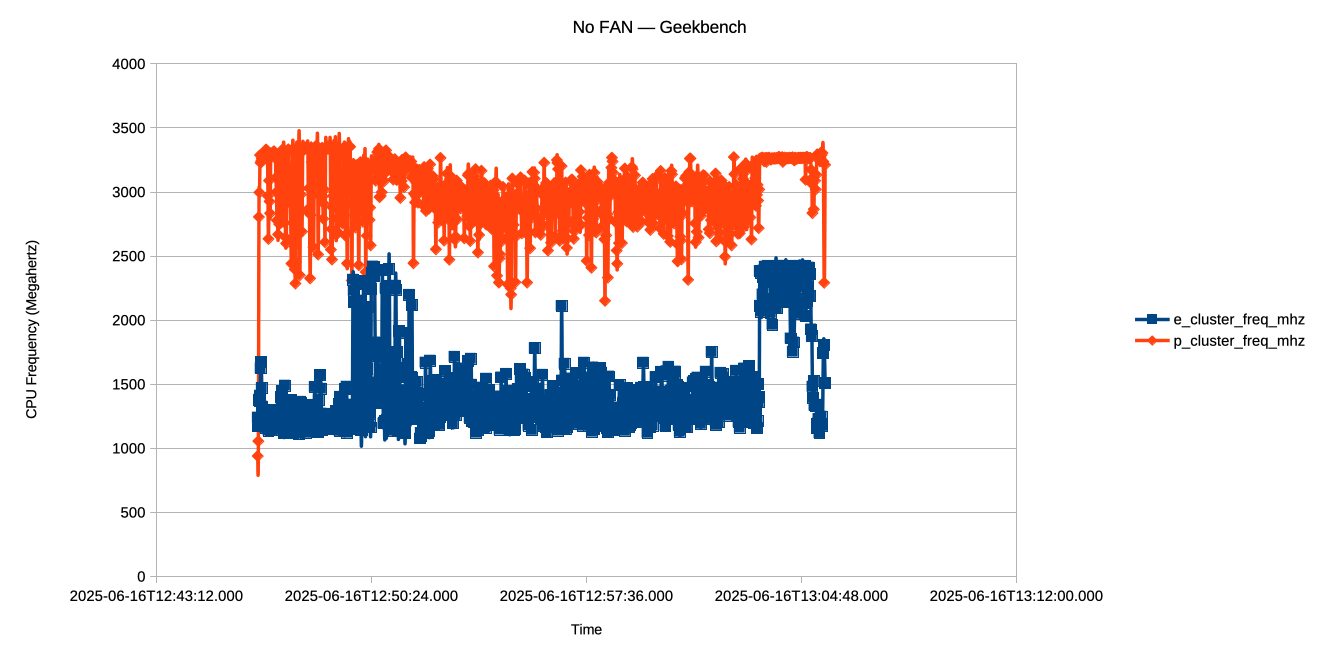
I wanted to use Geekbench, as it would also give me a score; however,
because of its differing suites of tests (image processing, numbers,
etc.), it did not produce constant stress on the CPU and did not produce
as clean graphs:
 ## Results
----------
### Clock Speeds
#### No Fan
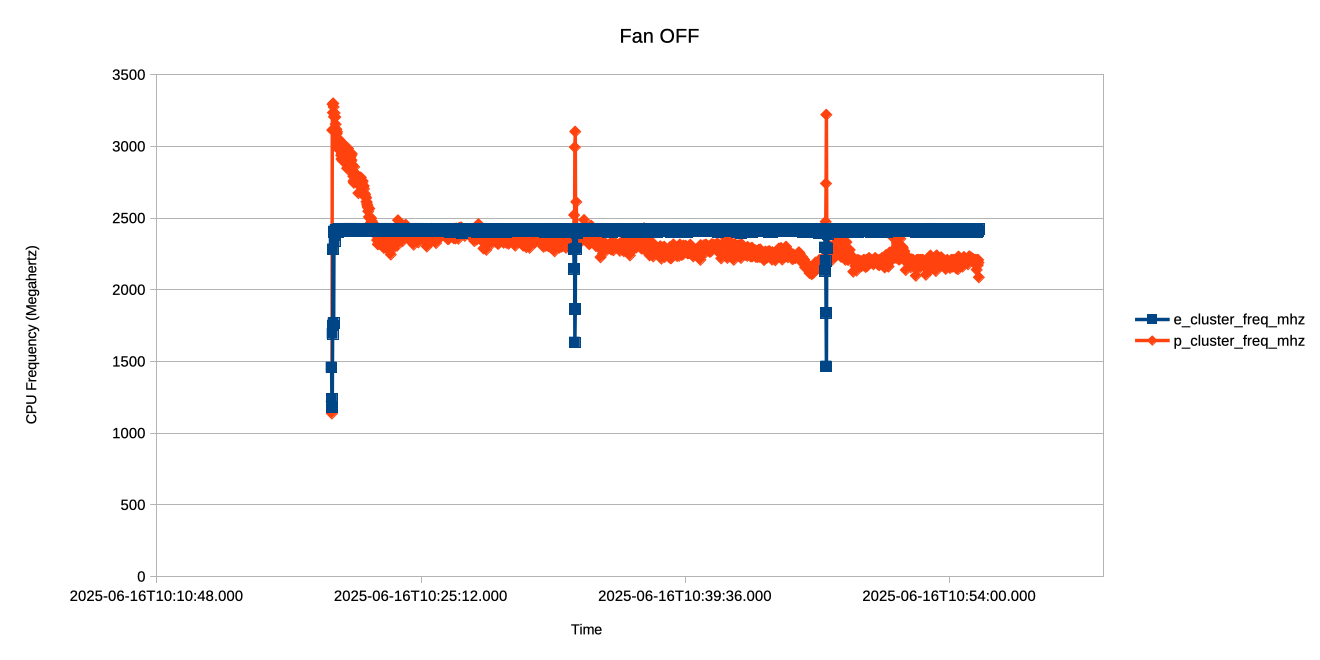
Starting the test, we see the frequency jump from resting around 1000
MHz close to its max clock speed of 3480 MHz. With the fan off, the
MacBook throttled after just 3 minutes of running the stress test,
dropping to 2300 MHz and slowly declining. The efficiency cores remain
stable at slightly below their rated max 2400 MHz.
Net change: -35%
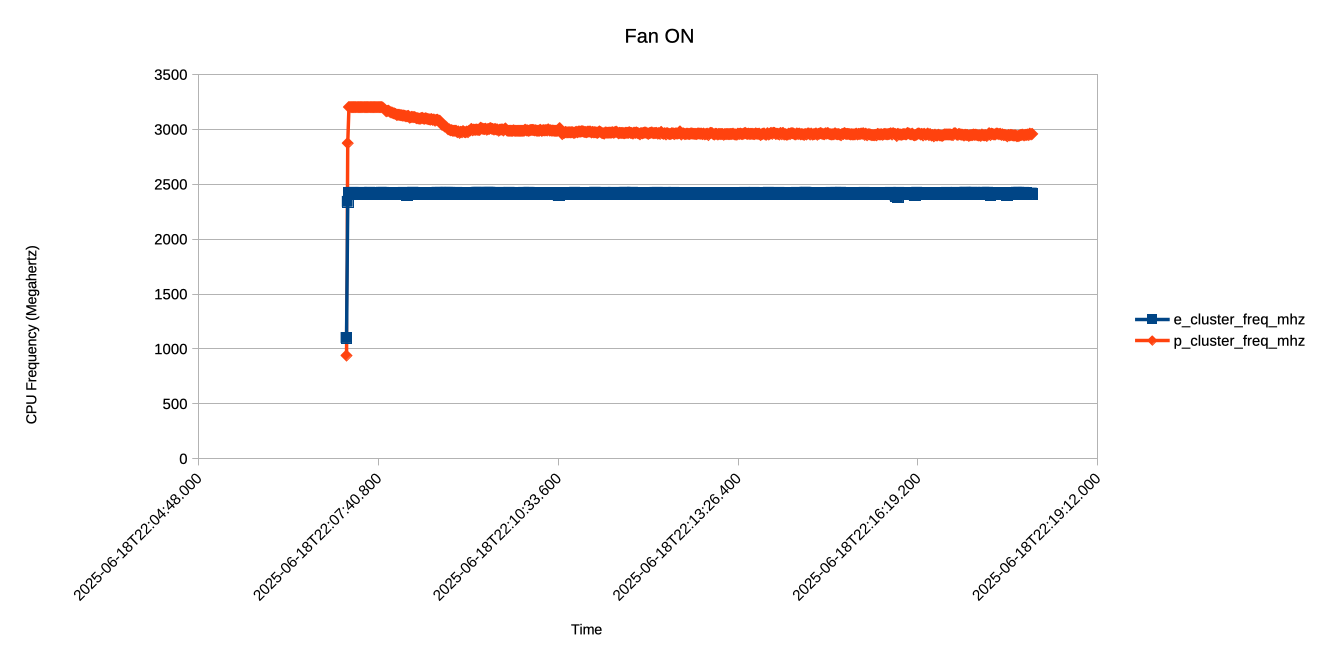
 #### Fan
With the fan, we still see signs of throttling; however, it levels off
at a very constant 3000 MHz, with the E-cores reaching a slightly
higher, max rated clock speed.
Net change: -9%
 ### Power
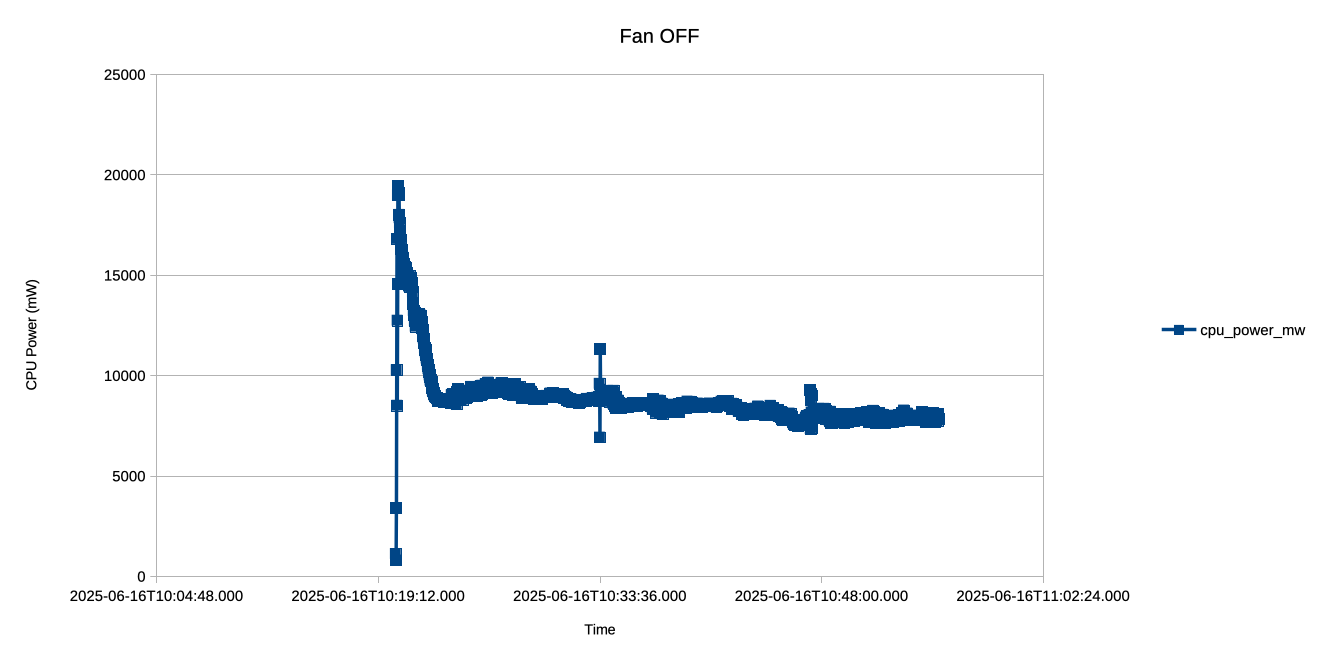
#### No Fan
This graph is nearly identical to the frequency chart, starting off
reaching the M2's rated TDP (Thermal Design Power) of 20W, then slowly
falling off to less than half, ending at around 7W.
Net change: -65%
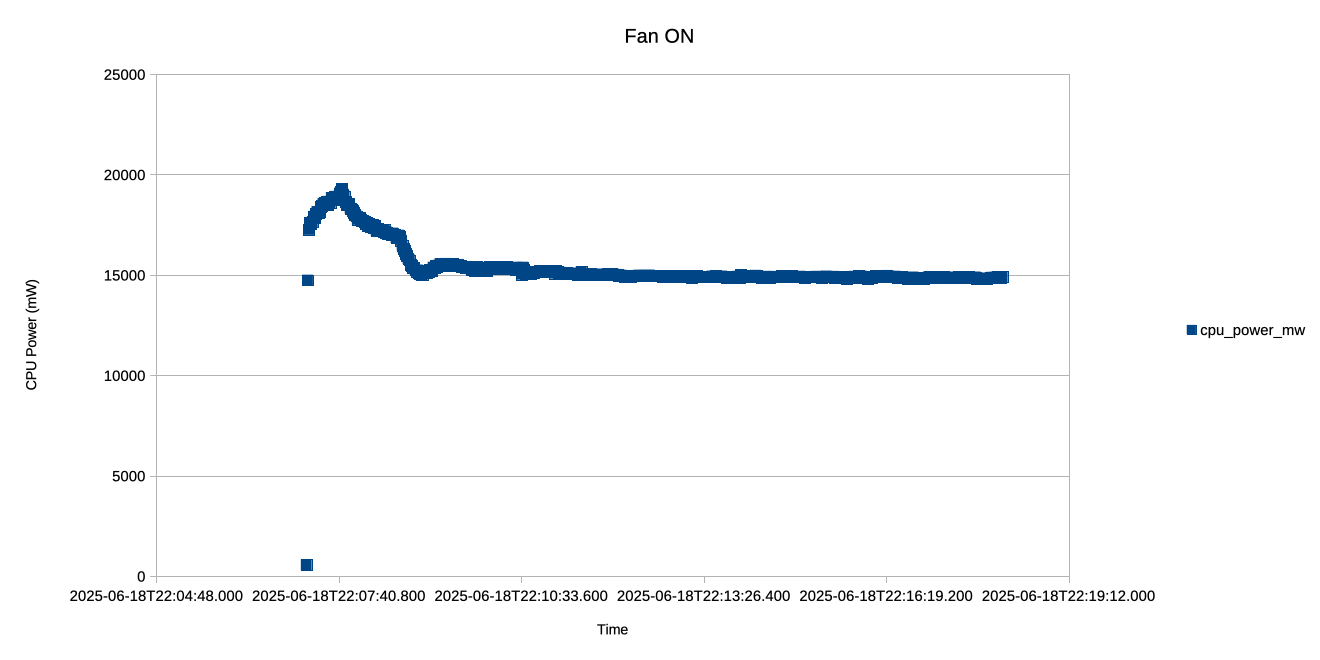
 #### Fan
With the fan on, we see a less significant drop; however, it still
manages to throttle to 15W, but remains constant around that.
Net change: -25%
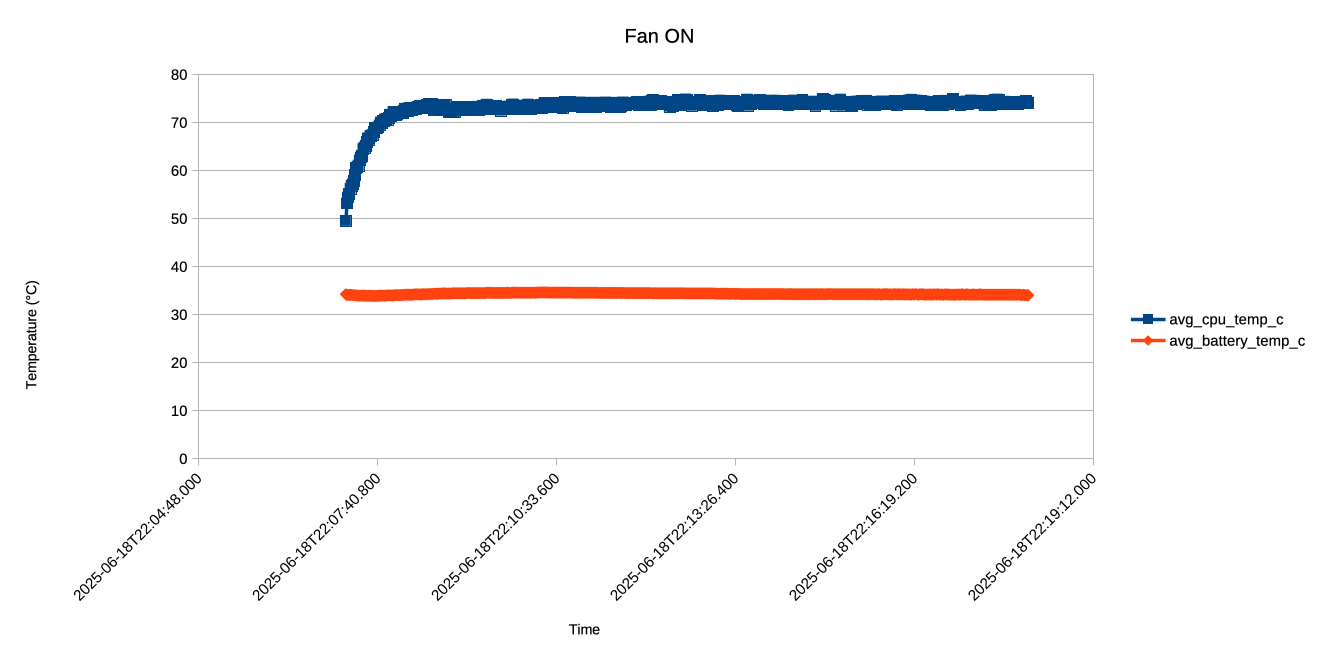
 ### Thermals
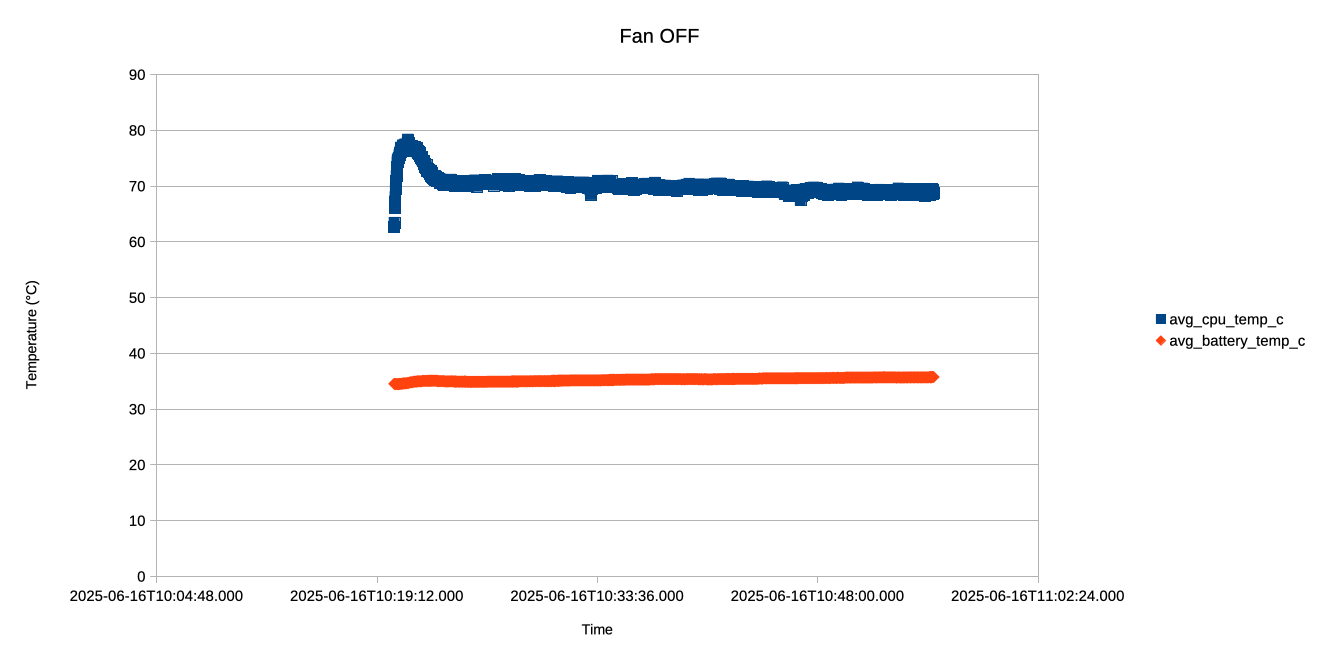
#### No Fan
Similarly, we see a peak at the start in line with the increased power
draw and declining as the CPU throttles. The battery keeps a stable
37°C, only seeing a 1°C incline.
Peak: 80°C Average: 74°C
 #### Fan
As expected, the CPU temperature takes much longer to ramp up to 75°C,
and stays there as it throttles to prevent the seeming max temperature
limit of around 74°C. The battery does not experience any change in
temperature.
Peak: 74°C Average: 74°C
 With the fan, the bottom of the laptop is cool to the touch, measuring
around ambient.
## Improvements
---------------
I could very easily add a microcontroller like a `Seeed SAMD21` or a
`RP2040` to control the fan via PWM, and through a USB Serial interface
with the computer. I could then run a continuous script, such as with
`PM2`, that uses `powermetrics` to query the CPU power draw in
conjunction with `smc-kit` to query the temperatures. Based on those
factors, I could tune either a simple P-curve or a more complex PID
curve (the latter not being of any use as we are not at the limits of
cooling throughput as the laptop still throttles), and adjust fan speed
accordingly.
However, these loads aren't sudden and are not applied randomly or
frequently. With my status bar showing CPU usage and my obvious
knowledge of what I'm doing on the computer, I find dialing the knob
high when I'm running intensive tasks isn't a big hassle, so I have put
off this integration.
## Conclusions
--------------
Overall, this is a very effective solution at curbing thermal
throttling. However, seeing that the MacBook is still throttling even
when the bottom is ambient temperature, it suggests that the SoC is
certainly not thermally sunk to the bottom at all, and likely only
through convection alone; the rest of the heat is being released from
the top, which the SoC likely has better contact with but is much harder
to cool. In this case, the Thermal Pad Mod (see before) might be a good
idea alongside this cooling solution, as it sinks the SoC to the bottom
for the air to be dissipated, allowing for more cooling capacity.
Even with over 55 CFM of air aimed directly at the bottom of the chassis
(I know, not "directed" or whatever), the MacBook still manages to
throttle. This adds to my regrets of not getting a Pro. 😦.
 <- back
<- Patching Raycast to Support Longer Pastes